Buyer Fit Snapshot
| Best fit | Print on Poly Mailers projects where brand print, material claims, artwork control, MOQ, and repeat-order consistency need to be specified before quoting. |
|---|---|
| Quote inputs | Share finished size, material target, print colors, finish, packing count, annual reorder estimate, ship-to region, and any compliance wording. |
| Proofing check | Approve dieline scale, logo placement, barcode or warning zones, color tolerance, closure strength, and carton packing before bulk production. |
| Main risk | Vague material claims, crowded artwork, missing packing details, or unclear freight terms can make a low unit price expensive after revisions. |
Fast answer: Print on Poly Mailers: Material, Print, Proofing, and Reorder Risk should be specified like a repeatable production item. The safest quote records material, print method, finish, artwork proof, packing count, and reorder notes in one written spec.
Production checks before approval
Compare the actual filled-product size with the drawing, then confirm tolerance on folds, seals, hang holes, label areas, and retail display edges. Reserve space for logos, QR codes, warning copy, and material claims before decorative graphics fill the panel.
Quote comparison points
Review material grade, print process, finish, sampling route, tooling charges, carton quantity, and freight assumptions side by side. A quote is only useful when the supplier can repeat the same color, closure quality, and packing count on the next order.
I watched a brand lose nearly 18% of repeat orders in one quarter for a reason the team never flagged in planning: they shipped a premium athleisure product in plain gray mailers, while a direct competitor shipped a similar item in sharply printed branded bags with clean barcode zones and a consistent unboxing look. I remember when that dashboard hit the screen in a Monday review—everyone wanted to debate ad creative, and I was the annoying person pointing at packaging (again). That same month, a client asked me how to print on Poly Mailers that could survive high-speed fulfillment lines in New Jersey and still look crisp when the package landed on a customer doorstep in Phoenix heat. The short answer: how to print on poly mailers is not “ink on plastic.” It is a manufacturing sequence that depends on film chemistry, surface treatment, print method selection, proofing discipline, and realistic QC tolerances. I’ve worked through this in plants in Shenzhen, Dongguan, and a flexo house outside Dallas. Honestly, the brands that win treat mailers like a real production SKU, not leftover packaging.
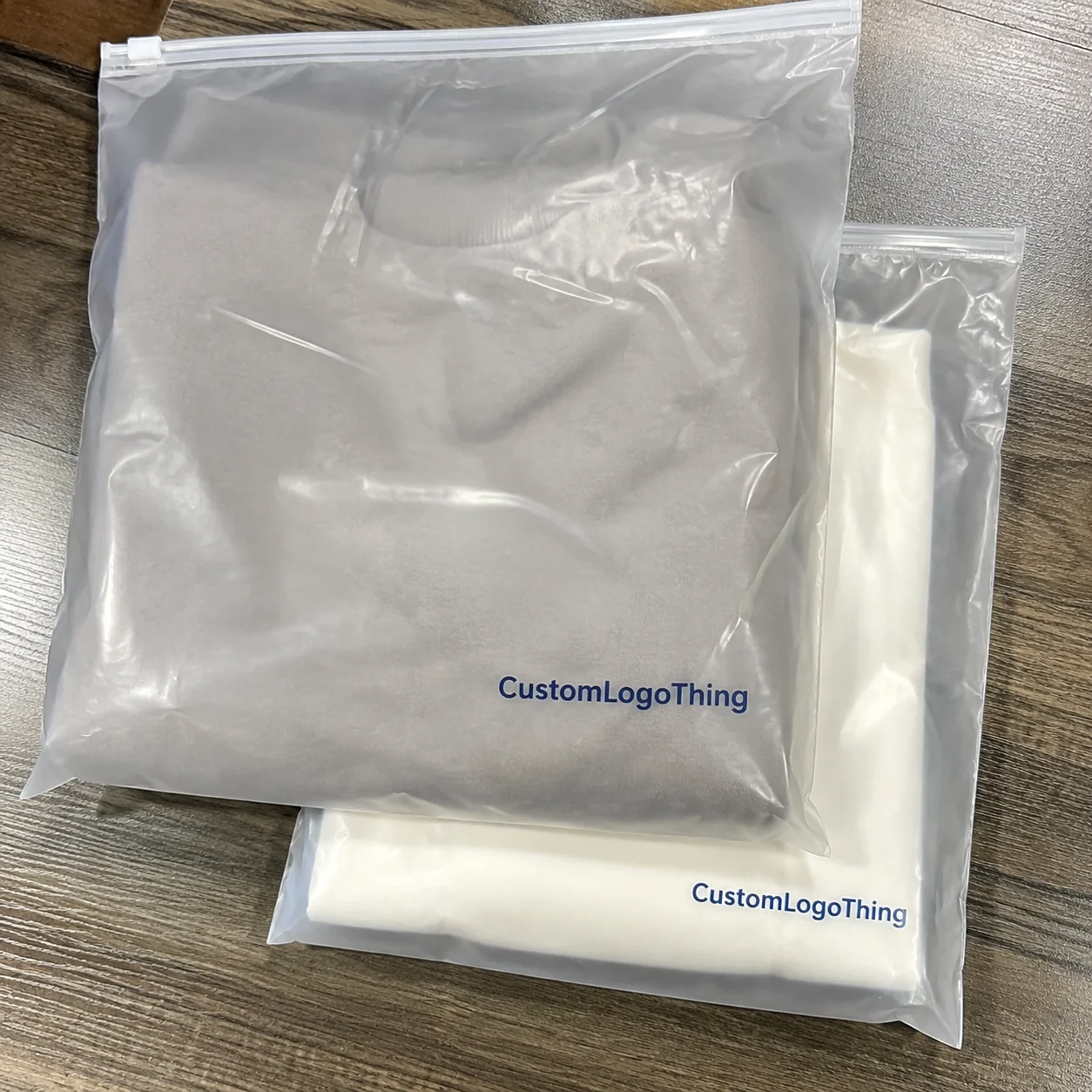
Poly mailers are lightweight shipping envelopes made from polyethylene films, usually LDPE or co-extruded multilayer structures (for example, 2.5 mil white exterior with gray or black interior layer). They’re popular for practical reasons: moisture resistance, lower dimensional shipping costs versus corrugate, and tamper-evident hot-melt closure strips. If you sell apparel, soft goods, or low-fragility products under roughly 2.5 lb, mailers often beat boxes on cost-per-shipment by $0.22 to $0.68 depending on zone and carrier mix. Ship ceramics, liquids, or impact-sensitive electronics and you’ll usually need corrugate or padded formats. I learned that one the hard way after a founder insisted on mailers for glass droppers, then called me after a weekend of damage claims. Not my favorite Saturday.
You’ll get factory-grounded guidance below: how to print on poly mailers from artwork prep to flexographic printing, gravure, digital printing, and post-print shipping label workflows, plus cost ranges, lead-time windows, and quality checks you can write directly into PO language. I’ll also call out where teams burn money on plate remakes, why seam zones destroy logos, and what ISTA standards can reveal about abrasion and transit performance.
How to Print on Poly Mailers: Why It Matters More Than You Think
Most teams underestimate how much a mailer influences repeat purchase behavior. I’ve seen two skincare brands with nearly identical AOV and ad spend perform very differently because one spent about $0.07 extra per unit on custom print and the other did not. The branded one captured stronger UGC and fewer “generic” perception complaints in support tickets. That came from a review meeting where we compared eight weeks of post-purchase survey data across 42,000 shipments.
If you are serious about how to print on poly mailers, define the job of that package in your customer journey first. Is it only a transport shell, or does it carry brand equity too?
Many DTC teams say branding matters, then approve a dull one-color logo on off-white film with no finishing strategy and wonder why the package looks weak under apartment hallway lighting. Even one-color art can look premium if film opacity, gloss level, and registration are controlled. I’ve stood in enough apartment hallways with sample packs to say this confidently (yes, neighbors stare).
Here’s the decision frame I use with clients:
- Ideal use case: apparel, accessories, plush items, lightweight refill pouches, soft home textiles.
- Borderline use case: boxed cosmetics or rigid gift sets that can dent if compressed.
- Poor use case: fragile glass, high-value electronics without inner protection, anything requiring crush resistance above what 2.0–3.5 mil film can handle.
A floor-level reality check: your print strategy must match your reorder rhythm. If your SKU mix changes monthly, digital printing or hybrid workflows may outperform traditional plates. If you run 100,000+ units per size and your artwork stays stable, flexographic printing usually delivers lower unit economics and tighter branding consistency batch to batch.
If you’re browsing Custom Packaging Products while narrowing options, compare poly mailers against your parcel profile by actual dimensions, return rate, and damage rate—not aesthetics alone. That single step prevents expensive pivots later.
How Printing on Poly Mailers Works on the Factory Floor
Factory flow is the fastest way to understand how to print on poly mailers without rework. A standard production line looks like this: film extrusion or co-extrusion, cooling and winding, corona treatment, printing, drying/curing, slitting, bag conversion, adhesive strip application, inspection, then final carton packing. Lose control at one stage and you’ll pay for it three stages later. I’ve watched this happen in real time—one tiny drift upstream, then everyone downstream does expensive heroics.
Polyethylene has naturally low surface energy. Untreated film makes ink bead, and adhesion fails under rub. Corona treatment is non-negotiable on most lines: it raises the surface dyne level (often around 38–42 dynes) so ink wets out correctly. I’ve seen a shipment where the treatment station drifted and only half the roll printed with acceptable bond. Tape pull tests caught it before dispatch, but the batch still cost three extra days and a late-fee negotiation.
Print method comparison from real production:
- Flexographic printing: Best value at medium to high volume. The sweet spot often starts around 10,000 to 25,000 units depending on color count. Plate setup adds fixed cost, then unit price drops quickly.
- Gravure printing: Excellent consistency for long runs and rich solid coverage. Cylinder cost runs higher, so it fits larger programs (often 100,000+ units) with stable artwork.
- Digital printing: Strong fit for low MOQ, seasonal graphics, and frequent revisions. Unit cost is higher, setup friction is lower. Useful for pilots and market tests.
- Screen/transfer methods: Niche use, usually for specialty effects or very short runs. Slower and less common for mainstream parcel volume.
Ink system matters more than most buyers expect. Solvent-based inks often deliver strong adhesion and rub durability on poly film, while water-based options may need tighter process control depending on substrate and press setup. If your shipments pass through conveyor-heavy hubs, run abrasion testing on purpose. I’ve watched “acceptable” art fail after 600+ miles in mixed freight where package-to-package friction was intense. That’s the moment everybody suddenly cares about rub tests.
Pre-print vs post-converted printing
Pre-print workflows place graphics on the film web first, then convert into bags. You get better registration control at speed, but only if dielines are precise enough to keep seams and flaps from clipping logos. Post-converted workflows print after bags are formed (often digitally), which supports quick-turn jobs but can limit coverage area and edge alignment. If your front-panel logo sits within 8 mm of a side weld, pre-print with strict tolerances is usually safer.
One more caution: do not map offset printing expectations directly onto film printing. Offset-like photo precision on rigid sheets does not automatically transfer to flexible poly film at production speed. You can still get excellent output, but only with realistic tolerances and proper substrate prep. I know this sounds obvious, but I’ve had this exact argument near a press at 11:40 p.m., holding a sample under fluorescent lights and trying not to laugh-cry.
Key Factors That Determine Print Quality, Durability, and Brand Impact
What do teams get wrong most often about how to print on poly mailers? They approve design before locking material specs. Film structure drives color, edge sharpness, and durability. A 2.0 mil mono-layer white film can print cleanly for simple logos. A co-ex 2.5–3.0 mil structure with an opaque outer layer usually delivers stronger hide and higher perceived quality, especially for light or pastel brand colors.
Artwork discipline carries equal weight. Use vector logos, define minimum line weight (I recommend at least 0.25 pt equivalent in many flexo contexts), set trapping where needed, and specify spot color values clearly. Printing process art requires expectation control for CMYK on film versus coated paper. Skin tones and soft gradients can shift, especially on gray-interior films where substrate influence appears under different lighting. If your art director says, “But it looked right on my monitor,” welcome to the club.
No-print zones are not optional. Keep adhesive flap areas, side seams, bottom fold/gusset distortion regions, and barcode quiet zones clean. I reviewed a 50,000-unit batch where a brand placed a QR code too close to a side weld; scan failure climbed above 9% in warehouse intake, and the retailer issued chargebacks. Easy fix, expensive lesson.
Quality management needs physical checkpoints, not just PDFs:
- Press drawdown or ink draw sample on the actual film lot
- Adhesion and rub test after cure
- Color tolerance agreement (for example, acceptable visual delta band on the approval sheet)
- Seam integrity and closure-strip performance checks
On compliance, include required notices where applicable: recycling marks, suffocation warnings, and minimum legibility by destination market. Sustainability claims should align with credible frameworks, and you should avoid “recyclable everywhere” language unless your recovery stream data supports it. If you’re evaluating paper alternatives or mixed-material strategies, FSC resources help for fiber-based context: fsc.org. For parcel durability protocols, use ISTA testing guidance: ista.org.
Step-by-Step: How to Print on Poly Mailers Without Rework
This is the exact process I use with brands learning how to print on poly mailers for the first time. It works because each stage removes one risk category before money reaches the press. I’ve repeated this sequence so many times that my notebook margins practically auto-fill themselves.
Step 1: Define use case and SKU mix. Lock sizes, monthly volume by size, product weight range, and whether return mailers are required. A typical starter matrix: 10x13 in for tops, 12x15.5 in for hoodies, and 14.5x19 in for bundled orders. Launching with nine sizes on day one rarely makes sense unless fulfillment data supports it.
Step 2: Choose method based on run length and art complexity. Testing branding at 2,000–5,000 units? Digital printing usually lowers risk. Reordering 20,000+ consistently with one to three brand colors? Flexographic printing often wins total landed cost. Planning photo-heavy graphics at major volume? Evaluate gravure printing with long-term cylinder amortization.
Step 3: Build production-ready files. Outlined fonts, embedded links, spot-color callouts, locked dieline layer, 3–5 mm safe margins from seams, and explicit no-print zones around closure strips. Teams fail how to print on poly mailers here all the time by submitting web graphics instead of press-ready assets. I still get 72 dpi PNGs in 2026, and yes, I sigh every single time.
File checklist
- Vector art in AI/PDF with editable layers
- Color mode and swatches defined (CMYK or spot-color strategy noted)
- Minimum line and text size validated for the chosen process
- Barcode and QR contrast validated on final film color
- Dieline approved with seam, flap, and gusset indicators
- Version-control naming (v1.0, v1.1, etc.) to prevent wrong-file runs
Step 4: Review proofs in two stages. First, a digital proof for content and layout. Second, a physical press proof for color and adhesion expectations. Skip the physical sample only if you’re comfortable gambling brand color on a screen preview. Screens do not predict film-scatter behavior under warehouse lighting.
Step 5: Approve a pre-production sample and test in live operations. Run 30–100 pieces through your pack station, scanners, sortation, and carrier handoff. Check pack speed, tape adhesion (if secondary tape is used), and thermal label anchoring on the printed surface. If thermal labels tunnel or lift, adjust varnish/coating spec before scaling; don’t “monitor it later.”
Sample approval checklist
- Logo centering and registration within agreed tolerance (example: ±1.5 mm)
- No ink smudge after 20-cycle rub test
- Closure strip peels cleanly and bonds fully
- Barcode scan success above internal target (often 99%+)
- Side welds pass burst and pull checks
- Carton packing count verified (no short packs)
Step 6: Launch with in-line QC checkpoints. During production, set inspection frequency by roll or by time interval, monitor ink density, registration drift, seal integrity, and adhesive coat consistency. I prefer first-off approval, hourly checks, and retained end-of-run samples.
Step 7: Perform arrival inspection and create reorder standards. Photograph approved samples under fixed lighting, store one control pack per lot, and record tolerances in the procurement file. That one SOP move turns reorders from stressful to predictable. Kinda boring, absolutely useful.
If your team is sourcing now, review Custom Poly Mailers and request quotes with identical specs so comparisons stay fair. A quote without exact mil, print coverage, adhesive spec, and carton count is not a true comparison for how to print on poly mailers.
Cost and Pricing Breakdown for Printed Poly Mailers
Now to the numbers. Real pricing for how to print on poly mailers depends on resin grade, film thickness, bag dimensions, number of print colors, print coverage percentage, method, and freight lane. For a common 10x13 in mailer at 2.5 mil, one-color flexo at 10,000 units may land around $0.14–$0.21 each ex-works. A short digital run at 2,000 pieces might sit around $0.28–$0.45 each depending on coverage and supplier setup. Regional energy and resin swings can move those bands, so treat them as planning ranges, not universal guarantees. If you get quoted something wildly below those numbers, ask questions before celebrating.
Separate fixed from variable costs. Fixed items include plate or cylinder setup, color matching, and press setup waste. Variable costs include resin, ink consumption, converting labor, and packing. If a supplier combines everything into one all-in line, ask for a split anyway. You need visibility to model reorder economics accurately. I’m opinionated here: “all-in” quotes are where surprises go to hide.
| Print Method | Typical MOQ Range | Setup Cost (Typical) | Unit Cost Trend | Best Use Case |
|---|---|---|---|---|
| Digital printing | 500–5,000 | $0–$250 | Higher per unit, stable setup | Launches, frequent artwork changes, pilot runs |
| Flexographic printing | 5,000–100,000+ | $180–$900 (by colors/size) | Drops sharply at volume | Recurring branded programs with stable graphics |
| Gravure printing | 50,000–500,000+ | $1,200–$4,500+ cylinder set | Very efficient at scale | Large runs with strict consistency targets |
Hidden costs usually surface in three places: revision loops, logistics, and failure penalties. Rush production can add 12–30%. Split shipments can add $300–$1,200 per leg depending on carton count and route. Retailer chargebacks for unreadable barcodes or missing warning language can erase savings from the cheapest quote in a single cycle.
I usually recommend a three-stage budget:
- Pilot run: 2,000–5,000 units to validate print and operations.
- Scale run: 10,000–30,000 units once specs stabilize.
- Annualized plan: blended cost tied to forecast and reorder cadence.
For how to print on poly mailers, compare supplier quotes on identical inputs: same mil, same dimensions, same adhesive strip grade, same carton pack count, and same QC checkpoint list. If one quote comes in 20% lower, verify whether film thickness quietly dropped from 2.5 mil to 2.0 mil or the resin blend changed without a performance discussion. That check alone is gonna save someone a rough quarter.
Production Timeline: From Artwork Approval to Delivered Mailers
A realistic timeline for how to print on poly mailers includes multiple gates: RFQ/spec alignment, artwork prep, proofing, tooling (if required), production slotting, manufacturing, and transit. First orders move slower because standards are being built. Repeat orders move faster because those standards already exist.
Typical windows I give clients:
- Short window: stock-size digital jobs with simple art and rapid approvals.
- Medium window: custom size plus flexo with new plates and one proof cycle.
- Long window: complex graphics, multiple revisions, peak-season capacity pressure, or long-distance freight.
Most delays come from internal bottlenecks, not press speed. The worst pattern is unclear ownership. One brand I supported had design in Los Angeles, procurement in Austin, and warehouse receiving in Ohio, with no timeline owner. They lost nine business days to approval loops alone. I still use that story in kickoff calls because it gets everyone’s attention fast.
Fast-track options
You can accelerate how to print on poly mailers with tradeoffs: choose in-stock sizes, reduce color count, accept digital overprint instead of full pre-print conversion, and pay priority slot fees. It works. Unit cost rises and design freedom narrows.
I recommend assigning three internal owners on every project: design owner (files and proof signoff), procurement owner (quote/spec/PO control), and receiving owner (arrival inspection and discrepancy reporting within 24–48 hours). Add a reorder trigger based on weekly burn rate; for example, reorder when on-hand inventory drops to five weeks of demand plus transit buffer. Boring? Yes. Effective? Also yes.
Common Mistakes, Expert Fixes, and Your Next Steps
After two decades helping teams solve how to print on poly mailers, I keep seeing the same errors: low-res art, ignored seam zones, unrealistic photo expectations on dark films without white underprint, skipped adhesion tests, and too many sizes before demand patterns are clear. Every one of these is preventable.
Mistake: Approving color from a monitor screenshot.
Fix: Approve a physical press proof on actual substrate under real lighting conditions.
Mistake: Treating tolerances as “understood.”
Fix: Put tolerance language in the PO (registration, color variance band, defect thresholds, and an AQL reference).
Mistake: Launching with seven SKU sizes for a young brand.
Fix: Start with two to three sizes, measure pack-out efficiency and dunnage rates, then expand.
Scenario advice:
- Startup launching first custom mailer: Start digital at low MOQ, keep graphics simple, validate workflow, then move to flexo after demand stabilizes.
- High-volume DTC brand: Standardize film and adhesive specs across sizes, negotiate annual resin-index pricing bands, and consolidate artwork families.
- Marketplace seller needing compliant fast turn: Use stock sizes with controlled print zones, prioritize legibility and warning requirements over decorative coverage.
“The biggest savings we found wasn’t a cheaper quote. It was fewer reprints because our approvals became objective.” — Operations manager, 120k shipments/month apparel brand
Action checklist you can execute this week:
- Gather your current mailer spec sheet (size, mil, film color, closure type).
- Finalize dielines with seam/no-print zones clearly marked.
- Shortlist print methods (digital printing, flexographic printing, gravure printing) based on projected volume.
- Request matched quotes using identical specs and QC language.
- Approve a physical sample and run a mini fulfillment trial.
- Place a phased order (pilot + scale) rather than one oversized first PO.
- Create an internal mailer SOP with approved references and reorder triggers.
If you remember one thing, make it this: how to print on poly mailers is process discipline, not a design file upload. Nail substrate, method, proofing, and QC chain, and your mailers look better, ship cleaner, and reorder without chaos.
Actionable takeaway: before your next PO, create a one-page “print readiness sheet” with four locked items—film spec, print method, proof standard, and QC tolerances—and do not release production until all four are signed by design, procurement, and operations. That single gate catches most costly errors while there’s still time to fix them.
How do you print on poly mailers without smudging, peeling, or barcode problems?
Use the same sequence top plants use: treat film surface energy (typically corona), match ink chemistry to your polyethylene structure, proof on actual substrate, and validate with rub/adhesion/scanner tests before full production. Keep barcodes out of seam distortion zones and define acceptance tolerances in writing. That is the operational core of how to print on poly mailers that holds up in fulfillment and transit.
What is the best method for how to print on poly mailers for small quantities?
For small quantities, digital printing is usually the best starting point because plate costs are removed and artwork can be revised quickly. Keep print coverage practical, test adhesion on your exact polyethylene film, and run a short pilot first. Once volume climbs and artwork stabilizes, many brands move to flexographic printing for stronger unit economics.
How much does it cost to print on poly mailers with a custom logo?
Pricing depends on size, mil thickness, color count, print coverage, and order quantity. Traditional methods usually carry setup/tooling with lower unit rates at scale, while digital typically has lower setup and higher unit cost. Request tiered quotes that break out setup, per-unit, freight, and rush fees so comparisons stay accurate.
How long does custom printing on poly mailers usually take?
The timeline includes file review, proof approval, scheduling, manufacturing, and shipping. First orders usually take longer than reorders because standards and tooling are still being established. Most delays happen in revision loops and internal approvals, not in press runtime.
Can I print full-color photos on poly mailers without quality loss?
Yes, though results depend on method, film color, white underprint strategy, and calibration control. White film usually delivers better vibrancy than gray- or black-based structures. Request a press proof to validate gradients, skin tones, and fine detail before full production.
How do I prevent smudging or peeling after printing on poly mailers?
Use proper surface treatment (corona or flame), match ink chemistry to the film, and verify complete curing/drying before packing. Run rub and adhesion tests on retained samples, then define durability requirements in your purchase order, including acceptable defect thresholds.