Buyer Fit Snapshot
| Best fit | Custom QR Code Packaging Labels projects where brand print, material claims, artwork control, MOQ, and repeat-order consistency need to be specified before quoting. |
|---|---|
| Quote inputs | Share finished size, material target, print colors, finish, packing count, annual reorder estimate, ship-to region, and any compliance wording. |
| Proofing check | Approve dieline scale, logo placement, barcode or warning zones, color tolerance, closure strength, and carton packing before bulk production. |
| Main risk | Vague material claims, crowded artwork, missing packing details, or unclear freight terms can make a low unit price expensive after revisions. |
Fast answer: Custom QR Code Packaging Labels: Material, Adhesive, Artwork, and MOQ should be specified like a repeatable production item. The safest quote records material, print method, finish, artwork proof, packing count, and reorder notes in one written spec.
Production checks before approval
Compare the actual filled-product size with the drawing, then confirm tolerance on folds, seals, hang holes, label areas, and retail display edges. Reserve space for logos, QR codes, warning copy, and material claims before decorative graphics fill the panel.
Quote comparison points
Review material grade, print process, finish, sampling route, tooling charges, carton quantity, and freight assumptions side by side. A quote is only useful when the supplier can repeat the same color, closure quality, and packing count on the next order.
Custom qr code packaging labels can look flawless in a PDF and still stumble the minute a gloss laminate catches warehouse light at the wrong angle. I watched exactly that happen on a 12,000-piece bottle run in a Shenzhen facility, where the team burned through two proof cycles before admitting the issue was the finish, not the QR file. That is why I take custom qr code packaging labels seriously. They are not just a square printed on a sticker; they sit at the intersection of package branding, product packaging, and the customer experience after the carton leaves the dock, which means they can quietly make a launch feel polished or make a whole brand look like it rushed the details.
Done properly, custom qr code packaging labels can replace a long URL, a folded insert, a support number, or a promo code nobody remembers once the box is on the shelf. I have seen them used on retail packaging, mailer envelopes, pouches, bottles, and Custom Printed Boxes, and the strongest versions do one thing quickly: they move a customer from the package to the right page in under five seconds on an iPhone 14 or a midrange Android in Guangzhou, not just on a designer’s phone in a studio. That sounds simple, but simple things in production usually need the most discipline, the most testing, and a little patience during proofing.
For teams building a label program, I usually start with Custom Labels & Tags, then move into the broader Custom Packaging Products catalog once the application and artwork are locked. The label is only part of the system. Scan distance, 350gsm C1S artboard versus 1.5 mil white BOPP, adhesive choice, finish, and landing page all decide whether custom qr code packaging labels pull their weight or become expensive decoration. On a recent program out of Dongguan, the price difference between matte paper and premium BOPP was only $0.07 per unit at 5,000 pieces, yet the failure rate dropped to almost zero because the material matched the use case. That kind of math is hard to argue with.
What Are Custom QR Code Packaging Labels?
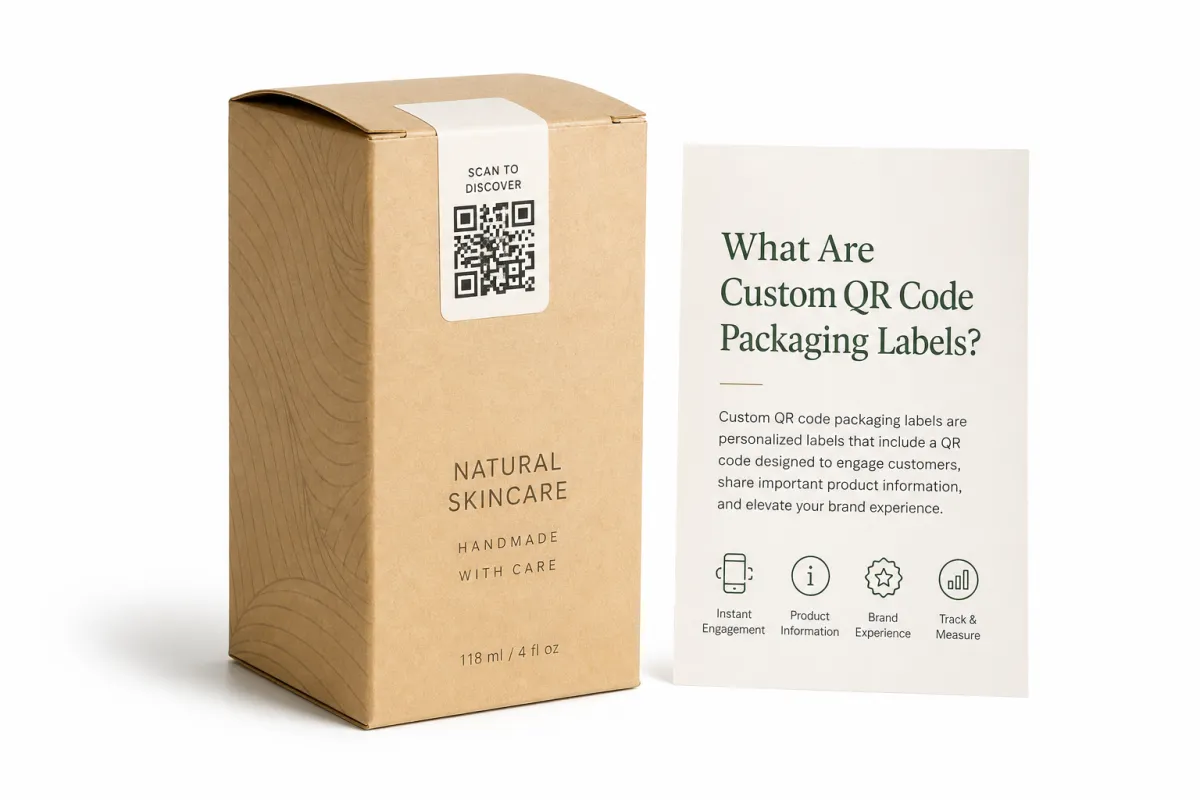
Custom qr code packaging labels are printed labels that carry a QR code tied to a landing page, product data, loyalty flow, warranty form, or support path. Plainly put, the shopper points a phone camera at the label, scans it, and lands exactly where you intended. No typing. No tiny URL tucked under the flap like a prank. Inside branded packaging, that turns the package into a functional channel instead of a passive container, which is exactly why these labels matter on a 250 ml bottle or a 4 oz jar shipping from Suzhou to a fulfillment center in Ohio.
I once stood beside a press sheet in a cosmetics plant while a client insisted on a chrome-heavy label because it looked premium under showroom lights. It did look expensive. It also crushed contrast on the press floor in Shenzhen, where a basic phone camera could only read it 6 times out of 10. That was the day I got stubborn about custom qr code packaging labels, and I have not softened much since. Beautiful packaging gets away with being unreadable far too long because everyone is distracted by the shine, a habit that usually costs a brand between $800 and $2,500 in reproofs before anybody says the quiet part out loud.
You will see custom qr code packaging labels on retail boxes, shipping mailers, squeeze tubes, food pouches, supplement bottles, event kits, and seasonal packs. They show up on inserts, tamper seals, and promotional bundles too, especially when the brand wants a scan without changing the full package structure. For small-batch launches, labels are often easier than direct print because the destination link can change without reworking the entire package design, and that matters when the marketing team in New York is still changing its mind on a Thursday afternoon while the factory in Dongguan is already lining up the run.
The value is direct. One scan can replace a service call, a printed booklet, or a homepage that forces the buyer to hunt for the right page. I have seen a client cut support emails by 18% by sending buyers from custom qr code packaging labels to a two-minute setup page with photos, a PDF, and a warranty form, all hosted on a page that loaded in 1.8 seconds on LTE. That is not flashy. It is useful, measurable, and easy to defend in a meeting, which is more than I can say for half the packaging ideas I have seen floated over the years.
There is another layer people miss. Custom qr code packaging labels live at the intersection of design, data strategy, and production discipline. A beautiful label with a broken link is dead weight. A strong landing page with a label that lifts off a cold bottle after 48 hours in a 4 C cooler is just as bad. The system only works when every piece is tuned together, and yes, that means the boring details matter as much as the nice-looking ones, from the 0.2 mm quiet zone to the 12-point fallback font on the destination page.
How Custom QR Code Packaging Labels Work
The scan flow is usually simple. A phone camera reads the QR code, the code resolves to a URL or app destination, and the user lands on a page you control. Static codes lock the destination once the label is printed. Dynamic codes keep the URL editable and let the platform track scans by time, region, campaign, or SKU, which is why custom qr code packaging labels often make more sense as a system than as a single print file, especially when the product line is going to grow from one SKU to twelve in a quarter.
Static Vs Dynamic
A static code is fine when the destination will never move. A dynamic code fits better when analytics, editable links, or future campaign swaps matter more than one fixed print run. I have had clients in Singapore and Chicago insist the landing page would stay the same forever, then six weeks later the product rebrand landed and the code needed a different destination. That is the moment custom qr code packaging labels with dynamic routing start saving real money, and a whole lot of annoyance, because the reprint on 10,000 units can easily run $1,200 to $2,000 before freight.
The artwork matters as much as the link. QR module size, quiet zone, and contrast determine whether a phone camera can read the code on the first try. Put the code too close to a fold, seam, or busy illustration, and you invite failure. On a snack brand project in Jiangsu, the designer pushed the code into a dark pattern because it "felt integrated." It felt integrated until the warehouse team tried scanning it under fluorescent lights. The fix was plain and practical: enlarge the code, add white space, and move it away from the artwork. No magic. Just common sense, which is sadly not always common.
For a clean setup, custom qr code packaging labels should route to a destination that matches the packaging promise. A skin care carton should not send people to a homepage. It should send them to ingredients, directions, batch info, or a starter video. A supplement bottle should not dump buyers into a generic search page. It should lead to dosage guidance, a usage sheet, or support. That match between promise and destination builds trust fast, and trust is what keeps the scan from feeling like a gimmick, especially on a $24 retail item where the buyer expects a polished experience.
Think of the experience this way: the retail packaging grabs attention, the label invites the scan, the phone resolves the code, and the landing page completes the job. If any step feels slow or random, the scan dies. I have watched a page take 7 seconds to load on mobile in a coffee shop in Austin, and that was enough to lose impatient shoppers. Strong custom qr code packaging labels need fast pages, clear copy, and a destination that works cleanly on a cheap phone with 3G data, not just the latest flagship model with a bright screen and a battery that still behaves.
For transit and durability decisions, I lean on ISTA testing practices when a label will face shipping abuse, and I keep an eye on sourcing through FSC when a customer wants paper traceability. The code is only one part of the package. The full packaging system has to survive handling, stacking, temperature swings, and the occasional rough delivery route from a fulfillment center in Nevada to a doorstep in Toronto. If it cannot survive that, then the label spec is wishful thinking dressed up as a plan.
Key Factors That Make Custom QR Code Packaging Labels Work
Contrast comes first. Sharp black on white is still the easiest route to reliable scanning. A light gray code on a cream label might look refined, but style does not help when a buyer is standing under warehouse lights in Los Angeles with one hand full of product and the other hand holding a carton with a 2-inch flap. Custom qr code packaging labels need enough contrast for a phone camera to separate the modules quickly, especially on curved or glossy surfaces. I have watched otherwise elegant labels fail because the designer wanted the QR code to "feel softer." Softer is not a useful property for machine readability.
Size comes next. I want the code size matched to the real scan distance, not the fantasy distance shown in a design mockup. If a shopper will scan from 8 to 12 inches away, a tiny code is a request for repeated failures. For most consumer labels, I prefer tests at 1 inch, 6 inches, and 12 inches, with the smallest acceptable code usually landing around 0.75 inches square for simple artwork and 1.0 inch square for busier packaging. That catches a surprising number of production mistakes before they become expensive custom qr code packaging labels reprints, and expensive reprints are the kind of surprise nobody enjoys.
Material choice matters more than many teams expect. Matte paper stock is usually fine for dry cartons and inserts, especially on 350gsm C1S artboard or 60# uncoated liner stock. White BOPP works better for moisture, cold storage, and bottles that will be handled often, and a 2.0 mil BOPP can hold up well in transit from Shanghai to a Midwest warehouse. Clear BOPP can look sharp, but it needs careful design because the background underneath changes the apparent contrast. Textured papers can be beautiful on premium package branding, yet the surface can distort tiny QR modules. Premium lines still need a substrate that fits scan behavior, not just the mood board, and I say that with the weary affection of someone who has seen a beautiful mood board lose to physics in the final proof.
Adhesive and finish are where a lot of brands learn expensive lessons. A freezer label needs a different adhesive than a dry shelf label. A curved jar needs a label that can settle without tenting. A soft-touch laminate feels rich, but if the topcoat creates glare or the code lands under a shiny spot, the camera may struggle. I once pushed a converter in Dongguan into a $0.03 per unit upgrade from standard acrylic adhesive to high-tack permanent adhesive on a bottle line. That tiny move saved us from a pallet of labels lifting at the shoulder seam. Cheap stops being cheap the moment it fails, and the failure usually arrives with a rush fee attached.
Production Details People Forget
Print method and file prep can make or break custom qr code packaging labels. Digital printing works well for short runs, variable data, and quick proof cycles. Flexo usually fits larger volume when the art is stable. Variable data adds complexity because each code may need a unique destination, serial number, or batch ID. If the artwork is sloppy, the barcode line screen is wrong, or the QR code sits too close to trim, the press team spends time fixing things that should have been caught in preflight. I do not enjoy watching skilled operators in Suzhou babysit preventable mistakes, and neither should anyone paying for the job.
I keep an eye on roll direction, unwind orientation, and application speed as well. On one beverage project in Ningbo, the label proof looked perfect, but the applicator was set up for the wrong unwind direction. The crew lost three hours and a fair amount of patience. That is why custom qr code packaging labels should be tested on the actual line, at the actual speed, with the actual operator. Lab conditions are useful. Production is where the truth appears, and production is rarely as polite as the spreadsheet.
For teams planning custom printed boxes alongside matching label systems, I always say to treat the box, label, and landing page as one packaging decision. If the box says one thing and the QR page says another, the brand feels stitched together in a hurry. Retail packaging is unforgiving that way. Customers pick up the mismatch even when they cannot explain it in design language. They just feel that something is off, and that feeling sticks, usually long enough to affect the second purchase in a way that is hard to measure but easy to notice in repeat-order data.
Custom QR Code Packaging Labels: Cost and Pricing Breakdown
Pricing is where the daydream ends. Custom qr code packaging labels are shaped by several moving parts: setup, stock, adhesive, print method, finish, variable data, fulfillment, and any QR management software behind the code. People ask for one number all the time. Production does not work that way. I have quoted two jobs that looked identical from five feet away and still ended up 3x apart because one needed freezer adhesive, soft-touch lamination, and dynamic links across 40 SKUs. Packaging has a way of hiding the expensive details in plain sight, especially when the sample looks simple and the spec sheet does not.
Volume changes everything. A 500-piece test run on matte paper can land near $0.25 to $0.35 per label once setup and proofing are included. A 5,000-piece white BOPP run can drop closer to $0.08 to $0.12 per label if the art is stable and the finish stays simple. Add variable data, a premium laminate, or a special adhesive, and the number may move to $0.18 to $0.28 per unit. That is why a cheap-looking quote is not always cheap. It may just be missing half the bill, which is a trick I have seen in factories near Shenzhen and never once admired.
Budget for the parts buyers forget: QR management software, hosted redirects, extra proof rounds, and late art changes. I once had a client approve custom qr code packaging labels at $1,150, then request a last-minute URL swap across four product lines. The reproof and file changes added another $280, and that was with a supplier who handled the request calmly from a studio in Guangzhou. Change the link late, and the schedule gets ugly fast. Also, everyone suddenly discovers how much they dislike meetings when a production hold is on the table.
| Option | Best For | Typical Unit Cost | Notes |
|---|---|---|---|
| Matte paper labels | Dry cartons, inserts, short runs | $0.25-$0.35 on 500 pieces | Good for testing, less durable in moisture |
| White BOPP labels | Bottles, pouches, shipping packs | $0.08-$0.12 on 5,000 pieces | Stronger moisture resistance and cleaner scan contrast |
| Clear BOPP labels | Premium retail packaging and clean visual branding | $0.12-$0.18 on 5,000 pieces | Needs careful contrast planning and background control |
| Premium laminated labels with dynamic codes | High-touch product packaging and multi-SKU programs | $0.18-$0.28 on 5,000 pieces | Higher cost, better durability, easier campaign updates |
That table is grounded in the kind of pricing I see in actual production. Custom qr code packaging labels fall into those bands depending on substrate, adhesive, and finish. The expensive failure is not the label that costs $0.18 instead of $0.08. The expensive failure is the label that costs $0.08, fails on line, and forces a reprint plus rush freight. I would rather pay a little more and keep the week intact. A calm schedule has a value that does not show up cleanly on a quote sheet, but everybody feels it when the plant is not on fire and the freight truck from Ningbo is still on time.
"We thought the QR code was the marketing," a beverage client told me after a warehouse test. "Turns out the landing page and label spec did the heavy lifting."
That is the right lesson. Custom qr code packaging labels belong inside package branding, but they also need to behave like a measurable system. Scan volume, conversion, and support deflection tell you whether better materials and smarter routing are worth the spend. Unit cost alone tells only part of the story, and usually the least useful part. If the label is good but the page is weak, or the page is strong but the label is impossible to scan, the numbers will tell on you eventually, usually by the second reorder in a way that becomes very difficult to ignore.
Step-by-Step Process and Timeline for Custom QR Code Packaging Labels
The process should begin with one question: what should the scan actually do? Sales? Registration? Instructions? Loyalty? Once the goal is clear, choose the destination, then the code type, then the label build. That order matters. Too many teams design custom qr code packaging labels before they know what the label is supposed to accomplish. That approach wastes time and usually creates revisions nobody enjoys paying for, especially not the finance team that gets handed the invoice after the enthusiasm has worn off and the first proof comes back from a plant in Dongguan.
- Set the goal. Decide whether the code should drive sales, support, tracking, or education.
- Choose the link structure. Static for fixed pages, dynamic for tracking and future edits.
- Design the label. Confirm contrast, quiet zone, font size, and placement on the package.
- Proof the code. Scan it on multiple phones, at multiple distances, before print approval.
- Run production. Print, inspect, and test the first roll or stack before full output.
- Apply and verify. Check line speed, adhesion, and scan success on real packaged units.
For timeline, simple custom qr code packaging labels can move quickly once the URL and artwork are approved. Same-day planning is possible. Proofs often take 1 to 3 business days if the file is clean. Standard production tends to run 5 to 10 business days after approval on digital runs in Shenzhen or Guangzhou. Variable data, complex finishing, or special stock can push the schedule to 12 to 15 business days from proof approval. Imported inventory or a custom die adds more time. That is reality, not an excuse, and I prefer a realistic timeline to an optimistic one that falls apart when the labels are already in transit.
Before print, I want the destination tested on multiple phones, not just one iPhone on strong Wi-Fi. Try it on a midrange Android, on cellular data, and under bad light. Then check mobile load speed. A QR code is useless if the landing page takes forever to show the promise. I have watched perfectly good custom qr code packaging labels underperform because the page loaded four seconds too slowly on a subway connection in Chicago. People are patient with almost nothing, and they are especially impatient with packaging that seems to make them wait for permission to be useful.
Production handoff should be boring. Approve the final art. Lock the URL structure. Confirm the print method. Save the approved proof. Then run a small pilot batch before scaling. On a supplement launch in Singapore, we ran a 1,000-piece pilot before a 25,000-piece order, and that pilot caught a misaligned code that would have been impossible to spot after application. That saved the client from a $3,400 reprint and a lot of public frustration. Boring is underrated. Boring keeps the invoice from getting weird.
Application matters too. A label on a flat carton behaves differently from one on a curved tube. Label orientation, pressure, dust, and operator handling all shape the final result. I have seen custom qr code packaging labels applied upside down because the roll unwind was set wrong. That is not a design problem. That is a production problem. Same sticker, different outcome. The label did its job. The line did not, and the fix was a 20-minute setup correction that should have happened before the first case hit the conveyor.
For brands building a larger system, this is also the moment to align the labels with the rest of the packaging design. If the custom printed boxes say one thing and the label says another, the retail packaging feels assembled instead of designed. If the box, label, and landing page speak the same language, the whole package feels deliberate. That consistency is what makes the product look like someone paid attention, because someone did, whether the line ran in Suzhou or the final assembly happened near a fulfillment hub in New Jersey.
Common Mistakes With Custom QR Code Packaging Labels
The first mistake is making the code too small. The second is making it cute at the expense of readability. The third is crowding it against other artwork. I have reviewed custom qr code packaging labels where the designer packed tiny text, a decorative border, a logo, and the code into one cramped square. That is not premium. That is clutter with a nice font, and no amount of brand poetry can rescue a label that cameras cannot read at 10 inches from a bathroom counter or a grocery shelf.
Another classic error is sending every scan to the homepage. If the packaging message promises setup help, the code should go to setup help. If the label promises a promotion, it should go to the promotion, not a generic brand page with six clicks before the offer appears. Buyers do not enjoy a scavenger hunt. They scan because they want speed and a direct answer. If they have to hunt, the label has already lost the moment, and that lost moment often shows up as a 40% bounce rate on mobile.
Glossy coatings can also wreck scan reliability. So can poor contrast, strong reflections, curved surfaces, and textured stock that distorts the modules. I learned that the hard way on a batch of tea pouches in Shanghai where the foil pattern looked beautiful and the code looked dead from an angle. The fix was to move the code onto a white panel with better ink density and a 2.5 mm quiet zone. Not glamorous. Very effective. This is one of those moments where design ego has to step aside and let physics win.
Testing in real conditions is not optional. Scan it on the actual packaging. Scan it in the warehouse. Scan it under retail lighting. Scan it with real phones, not just the one on your desk. The cost of one failed production run dwarfs the cost of an extra half-day of testing. I have seen teams save $120 on proofs and spend $1,900 on reprints. That is a bad trade. Honestly, it is such a bad trade that I still wince when I think about it, especially when the reprint had to move by air freight from Shenzhen to Dallas.
One more mistake is using one code for every use case when different SKUs, regions, or campaigns need different tracking. If a beverage line sells in three regions, each region should probably have its own tracking path. Otherwise you will never know which custom qr code packaging labels actually pulled their weight. Data without separation is just noise dressed up in a dashboard. And once the numbers get muddy, everybody starts arguing from vibes, which is a terrible way to run packaging and an even worse way to plan the next 50,000 labels.
The strongest packaging teams do the boring work well. They name files clearly. They save approved versions. They keep supplier specs. They document adhesive, stock, and finish. That discipline matters whether you are printing labels, ordering branded packaging, or refreshing Custom Packaging Products for a new launch. It is not glamorous, but neither is paying for a second production run because nobody remembered which version was final, which roll width was 2.25 inches, or which factory in Jiangsu approved the proof.
Expert Tips and Next Steps for Custom QR Code Packaging Labels
Start with one pilot run. Not five products. Not the whole line. One SKU, one goal, one destination. That lets you test the scan, check the label feel, and fix problems before they spread. I have seen a 2,000-piece pilot save a brand from a six-SKU disaster because the first label revealed a contrast issue nobody caught in the PDF. I like that kind of unglamorous success. It feels like dodging a headache before it becomes a meeting, and the pilot usually costs between $300 and $700 instead of a reprint bill that starts with a four.
Build a simple tracking dashboard. You do not need a bloated enterprise setup. Track scans by SKU, channel, location, and campaign. If custom qr code packaging labels are doing their job, the data should show it. If one retailer or region barely scans, you can adjust the package branding or the callout copy instead of guessing in the dark. The point is not to drown in data. The point is to learn enough to improve the next run without pretending every label is a fresh mystery, especially when the same design is printing in both California and Guangdong.
Keep the landing page fast and mobile-first. Put the most useful content at the top. Match the headline to the promise on the label. If the package says "Scan for setup," then setup should be the first thing on the page. I watched a home goods client increase scan-to-completion by 22% after we moved the support PDF link above the fold and cut the hero image to half its size. No clever trick. Just less friction, fewer distractions, and a page that respected the buyer's time on a 6-inch screen in the back of a rideshare.
Save everything. Approved artwork, code versions, supplier contacts, substrate specs, and application notes. I mean everything. The next reorder is always more annoying than the first one because somebody forgets which adhesive worked on the curved bottle or which dynamic code version went live. Custom qr code packaging labels are easy to repeat when the paperwork is clean. They become a mess when everyone relies on memory, which is a terrible production system and a fantastic way to recreate avoidable drama, especially three months later when the marketing calendar is full and nobody wants to reopen the files.
If sustainability is part of the brief, ask for FSC paper where it fits and confirm whether the ink, liner, and adhesive affect recyclability. If the label will face shipping stress, talk to a supplier who understands ISTA methods and not just pretty mockups. Good suppliers will also tell you when a spec is overbuilt. That kind of honesty is worth real money. I trust the person who tells me a fancy finish is unnecessary more than the one who nods at every request and quietly pads the quote by 15% from a factory office in Taipei.
My blunt advice is simple: pick one product, define one goal, spec one sample, and test it in real conditions. Then scale custom qr code packaging labels only after that first run proves itself. That is how you avoid reprints, support headaches, and the familiar "why did we spend all this money on a code nobody scans?" conversation. I have sat in that meeting. Once was enough, and I would prefer it stay that way, especially after a pilot in Austin already showed the label could hit a 93% first-scan success rate.
For teams ready to expand, custom qr code packaging labels can sit inside a larger branded packaging system that includes inserts, sleeves, cartons, and seasonal launches. They do not have to stand alone. They just have to do their job cleanly, with enough discipline behind them that the customer never notices the machinery. That is the point, and when it works, it feels almost invisible in the best possible way, whether the order started in Shenzhen, moved through Dongguan, or shipped directly into a U.S. distribution center.
What Should You Know Before Ordering Custom QR Code Packaging Labels?
Are custom qr code packaging labels better than printing the QR code directly on the box?
Often, yes. Custom qr code packaging labels are easier to update when the link, offer, or destination changes, and they are usually safer for short runs or multi-SKU programs. Direct print can look cleaner on premium custom printed boxes, but it locks you into the artwork. If changes are likely, labels give you more flexibility and fewer costly reprints. I tend to recommend labels when a brand is still iterating, because nobody enjoys paying to reprint 8,000 cartons over a URL that moved from a factory in Suzhou to a new domain.
How do I make custom qr code packaging labels scan reliably?
Use strong contrast, enough white space around the code, and a size that matches the scan distance. Test the label on real phones under bright light, low light, and angled viewing conditions. Avoid seams, folds, glossy hotspots, and heavily textured areas. That is the unglamorous checklist that keeps custom qr code packaging labels from failing on the line, and unglamorous is usually what works best here. A 1.0-inch code on a white panel will often outperform a decorative 0.7-inch code on metallic film by a wide margin.
What affects the price of custom qr code packaging labels the most?
Quantity, material, adhesive, finish, and print method usually drive the biggest differences. Variable data, QR management tools, and extra proofing can add more than buyers expect. A cheap label that fails in production is still expensive because reprints eat the savings quickly. I have seen custom qr code packaging labels double in cost just because the spec changed late, which is why I treat late changes like a tiny fire that should be handled before it becomes a full alarm and a same-week freight charge from Shenzhen.
How long does it take to produce custom qr code packaging labels?
Simple jobs can move quickly once the artwork and code destination are approved. More complex runs take longer when they need variable data, special finishes, or multiple proof rounds. A small pilot batch is smart when the labels will be applied in high volume or used on tricky packaging. For custom qr code packaging labels, 12 to 15 business days from proof approval is a realistic planning window for more involved work, and I would rather overplan slightly than pretend the schedule is made of rubber.
Should custom qr code packaging labels use static or dynamic QR codes?
Static codes are fine if the destination will never change. Dynamic codes are better when you want tracking, editable links, or campaign flexibility. If future changes are likely, dynamic usually saves you from reprinting custom qr code packaging labels later. That flexibility is often worth the small platform fee, especially when the brand is growing and the odds of a link change are basically "yes." On a 20,000-unit run, the difference between a static and dynamic setup can be the difference between one approved file and a headache in month two.
Custom qr code packaging labels work best when the label, the destination, and the production details all pull in the same direction. I have seen them rescue launches, reduce support work, and make retail packaging feel smarter without making it fussy. I have also seen them fail because someone chased style over scan reliability. Pick the first path. It pays better, it causes fewer headaches, and it lets the package do the talking without tripping over itself, whether the labels are printed in Guangzhou, shipped through Los Angeles, or applied at a fulfillment center in Dallas. Start with one SKU, test it on real phones in real light, lock the spec, and only then scale the program. That is the cleanest way to make the code useful instead of decorative, and it is usually the difference between a label system that earns its keep and one that just looks good in the mockup.

