A clothing order can look finished on a spreadsheet and still fall apart at receiving. One bad label is enough to trigger a manual check, a reprint, or a delayed inbound count, and those delays rarely stay small for long. That is why pre printed QR Code Labels matter: the code is not just decoration, it is a machine-readable link between the garment and the data behind it.
The real value sits behind the square. The label has to survive folding, bagging, shipping, touchpoints in the warehouse, and whatever happens after the garment reaches a store or customer. A code that scans once at proof stage and fails after handling is not a minor defect. It is a process failure disguised as a print issue.
What Pre Printed QR Code Labels Do on Clothing
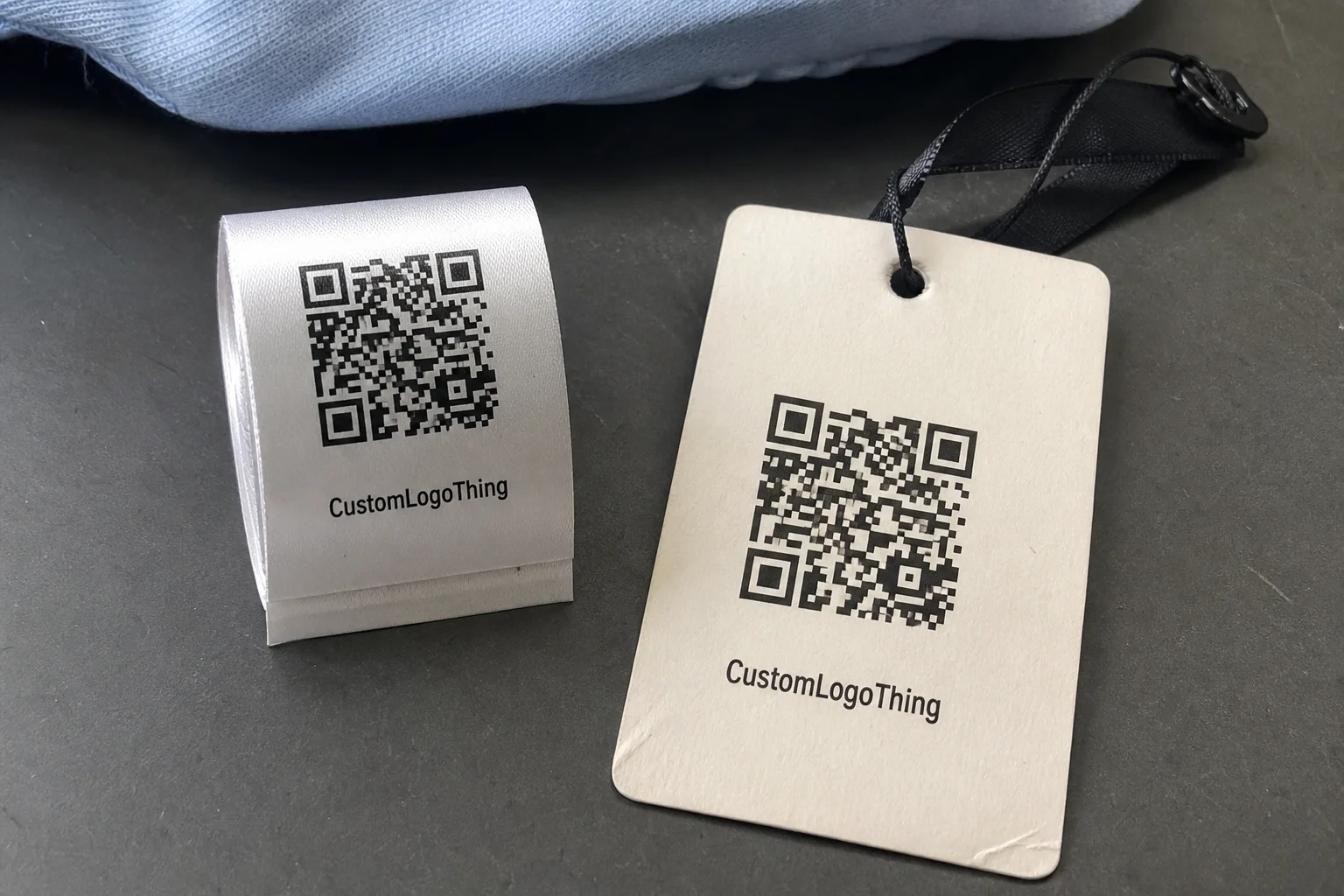
On apparel, QR labels usually serve operations first and branding second. They can point to a SKU, style record, care instructions, product page, lot number, return workflow, or internal inventory record. In practice, pre printed qr code labels are less about the symbol itself and more about making sure the garment can be identified without anyone typing the same information twice.
"Pre printed" matters because the data is encoded during production, not added later by hand. That distinction sounds small, but it changes the risk profile. A manually applied sticker may work for a correction or a short run, yet a production order needs a label that arrives ready for receiving, scanning, and downstream use without extra handling.
Clothing is not a clean, flat carton. Labels can be sewn into seams, folded inside a polybag, pressed under a hanger, rubbed during transit, or compressed in storage. A QR code can print perfectly and still fail if the stock curls, the finish cracks, or the symbol is too small for the scanner being used.
A code that scans in pre-production but fails after folding or shipping is not a cosmetic defect. It is a data problem that has moved into the physical world.
For most buyers, the question is simple: what does the label need to do?
- Identify a garment at receiving.
- Support pick, pack, replenishment, or cycle-count scans.
- Carry care or compliance information to a customer-facing page.
- Support returns, warranty claims, or inventory lookup.
If you are comparing constructions, review the Custom Labels & Tags options with the garment environment in mind. A label that looks polished in a mockup can still be the wrong structure for a sewn seam, a humid warehouse, or a handheld scanner used at speed.
How Scan Data Moves from Artwork to Warehouse
The cleanest workflow starts with a data file, usually a spreadsheet export from ERP, PIM, or inventory software. Ideally, each row maps to one unique label record. If the source data is inconsistent, the print run becomes a cleanup exercise, and cleanup is where expensive mistakes hide.
The artwork file and the data file need to be checked together. A QR symbol can look perfect and still point to the wrong SKU, the wrong page, or an outdated record if the merge is sloppy. That is why production teams should verify both the visible artwork and the encoded destination before the run is approved.
It helps to think about the path in three stages: encoding, receiving, and downstream use. Encoding happens at print. Receiving is the first scan at intake or warehouse entry. Downstream use is everything after that, from shelf replenishment to returns processing. If any stage uses a different identifier logic, the system starts drifting.
Scan reliability depends on details that are easy to under-spec and hard to fix later: contrast, quiet zone, symbol size, substrate, and print sharpness. Apparel labels are often small, so there is less room for weak contrast or sloppy edges than many teams expect.
If the code resolves to a live database, confirm whether the destination can handle future updates or redirects. Static and dynamic codes behave differently. A static QR code is simple and stable. A dynamic code can be changed later, but only if the redirect and destination logic are maintained with care. If the link layer is not controlled, the supposed flexibility becomes another point of failure.
For distribution and material durability, buyers often anchor their checks to external standards instead of guessing. ISTA testing standards are useful for packaging and transit conditions, while FSC guidance matters when paper-based stock and sourcing claims are part of the brief.
Pricing, MOQ, and Unit Cost Drivers
Unit cost is driven by more than label count. Material type, print method, variable data handling, finishing, verification, and freight all affect the quote. If one supplier includes scan checks and another does not, the cheaper number can be false savings.
Low quantities usually cost more per label because setup, file prep, proofing, and calibration are fixed costs. Larger orders spread those costs over more pieces. That is why a 500-piece run and a 5,000-piece run can land in very different price bands even when the artwork is identical.
A workable quote should separate setup, file prep, encoding, proofing, freight, and any rush charge. If the supplier bundles everything into one line, comparison becomes difficult. Buyers end up comparing headlines instead of spec.
| Label option | Typical MOQ | Unit cost at 5,000 pcs | Typical turnaround | Best fit |
|---|---|---|---|---|
| Paper QR label | 2,000+ | $0.06-$0.12 | 5-8 business days | Carton inserts, short-life tags, internal routing |
| Synthetic film label | 1,000+ | $0.11-$0.19 | 7-12 business days | Higher handling, better moisture resistance |
| Laminated or abrasion-resistant label | 1,000+ | $0.18-$0.32 | 10-15 business days | Warehouse scanning, frequent touchpoints |
| Woven or satin sewn-in label | 3,000+ | $0.14-$0.26 | 12-18 business days | Garments that need a softer apparel finish |
Those ranges are directional, not universal. Coverage level, custom die-cutting, variable data, or an extra verification pass can raise the price quickly. But for budget planning, they are more useful than a vague promise of "affordable" that tells you nothing about the actual build.
If you need to compare constructions side by side, the Custom Labels & Tags page is the right place to align format, stock, and use case before pricing starts. That avoids a common mistake: asking for a quote on the wrong structure and then trying to force the result into the garment program.
Production Steps and Turnaround Timing
The process usually begins with intake: product spec, artwork, data file, quantity, scan requirement, and final use case. The stronger the brief, the fewer delays later. A clean file can save days. A vague one can eat them faster than most teams expect.
Proofing should not stop at a PDF viewed on a laptop. A digital proof is useful, but for pre printed qr code labels, the smarter check is a scan test on the printed proof. If the code reads on screen but fails on the actual substrate, the proof was incomplete.
Production typically includes encoding, print verification, finishing, and packing. For apparel, finishing matters more than many buyers assume. Trimming, folding, lamination, die-cutting, and sewing can all affect how the code behaves after handling.
Turnaround often stretches when the data file contains duplicates, missing fields, or inconsistent naming. Approval delays do the same. If three departments need to review the artwork, the care copy, and the compliance text, the schedule can slip even when the press is ready. A fast quote does not matter much if the approval chain is still open.
Ask for the file cutoff, the expected ship date, and whether a reproof resets the clock. Those details matter more than a headline claim of speed. In practice, the real schedule is usually built on proof approval, not on the initial estimate.
Material and Spec Choices That Protect Scan Reliability
Choose the construction for the garment environment, not just the visual brief. Sew-in, woven, satin, heat-seal, and hangtag formats behave differently under wear, flex, and laundering. A label that looks refined on paper can still fail after the first wash cycle if the material or finish is wrong.
Scan reliability improves when the code is large enough for the scanner being used and has enough contrast against its background. Tiny codes are risky on soft goods because seams, folds, and trim can crowd the symbol. A code can remain technically valid and still be unreadable if the scanner cannot get a stable view.
If the garment will be washed or exposed to friction, ask about ink durability, coating, and edge finishing. This is where many buyer disappointments begin. Shipping survival is not the same as laundry survival. If the label must survive repeated wash cycles, ask for test language instead of assuming the base stock will be enough.
Placement matters too. A code tucked into a seam allowance or wrapped around a curved edge may look tidy in a mockup, but a scanner does not care about tidy. It cares about visibility, quiet zone, and contrast. On apparel, the best location is often the one that looks slightly less elegant and scans more consistently.
For higher-risk programs, match the code format to the scanning behavior you actually need. Phone-first consumer use can tolerate different sizing than warehouse handheld workflows. A store associate scanning from arm's length has a different requirement than a fulfillment picker processing dozens of pieces an hour.
That is also why a small pilot run is worth the time. A sample batch can reveal whether the print finish, stock thickness, or garment placement creates real failures that a mockup would never show. On paper, many setups look adequate. In a warehouse or on a production line, the weak point usually appears fast.
As a rough buying rule, paper labels work best for short-life internal use, synthetic films for moisture and handling, and laminated options for frequent contact or rougher routing. Woven and satin constructions are better when the garment finish matters more than the label's flatness. None of these choices is universal, and that is exactly the point. The right material depends on the handling cycle, not on the marketing description.
Common Ordering Mistakes That Break the Code
The most common mistake is encoding the wrong data version. Teams update the product name or SKU in a spreadsheet, but they forget to regenerate the actual code file. The label then looks current while pointing to an older record. That is a clean-looking failure, and the clean ones are usually the hardest to catch.
Another problem is choosing a size that looks fine in a mockup but fails once the garment is folded, stitched, or compressed in packaging. A mockup lives on a flat screen. Apparel lives in motion. That gap matters more than most first-time buyers expect.
Skipping post-production scan tests is expensive. Test the exact label on the exact garment after the intended handling condition, not a generic sample on a table. If the test does not include folding, packing, and the real scanner, it is not a real test.
Version control gets messy when marketing, operations, and compliance all touch the same file. The project drifts into mismatched codes, mismatched copy, and unnecessary reprints. People often blame print quality when the actual issue is file governance.
Do not assume a code that scans in the factory will still scan after laundering, shipping, or retail handling. Apparel is a stress test. If the spec ignores that, the code is only reliable in the easiest possible scenario.
One more mistake shows up in sustainability claims. If the stock is paper-based and the buyer wants sourcing documentation, ask for the claim at the quoting stage. That is where FSC, recycled content, and chain-of-custody questions belong, not after the purchase order is already issued.
The shortest path to a bad launch is to approve the artwork before the data file is stable. The second shortest is to skip the final scan check because the mockup looked fine. Both decisions create the same outcome: a label that looks finished and behaves like an unfinished one.
What to Confirm Before You Place the Order
Build a one-page spec sheet before requesting the final quote. Include quantity, material, placement, code content, scan device, wash requirements, and any regulatory or care-label text. A supplier can work from that without guessing, which is usually how the best production outcomes start.
Ask for a sample or preflight proof and insist on a real scan check. Visual approval is useful, but it is not enough. A scan report tells you whether the data path works. That is the difference between looking ready and being ready.
Compare suppliers on the same assumptions: same artwork, same quantity, same substrate, same encoding method, same turnaround. If one quote includes verification and another does not, note the difference clearly. Otherwise the pricing conversation gets distorted and the lower number wins on paper only.
If the order is new or high risk, start with a pilot run on a limited SKU set. That gives you a controlled read on scan performance, handling, and reorder flow before you scale. It is cheaper to learn on 300 labels than on 30,000.
Before You Buy pre printed qr code labels, verify the code structure, proof, material, and turnaround in writing so the launch date, pricing, and data logic all line up. That final check often saves the project from a preventable reprint.
What should pre printed qr code labels include for clothing?
At minimum, include the identifier your operations team actually uses, such as SKU, style code, size, color, lot, or care data. Keep the field structure stable so the same code does not point to different records over time. If the label needs to support returns or replenishment, make sure the destination record can be updated without breaking the scan.
Are pre printed qr code labels washable on garments?
They can be, but wash performance depends on the label stock, ink system, coating, and how the label is attached to the garment. Always test the finished label after laundering, not just before it ships. If the code must survive repeated wash cycles, ask for a durability spec instead of assuming the base material is enough.
How do I choose the right size for pre printed qr code labels?
Use the smallest size that still scans reliably with your actual scanner or phone setup, then validate it on the garment itself. Leave enough quiet zone around the code so folds, seams, or trim do not crowd the symbol. If the label will be handled quickly in a warehouse, size and contrast matter more than decorative layout.
What MOQ should I expect for pre printed qr code labels?
MOQ depends on material, print method, and whether the supplier must encode variable data for each label. Digital runs can often support lower quantities, while specialty finishes or color-critical work may require higher minimums. Ask for a quote at your exact spec so you can compare MOQ with true unit cost, not just the headline number.
How fast can pre printed qr code labels be turned around?
Fast turnaround is possible, but the schedule usually depends more on artwork approval and data cleanup than on print speed. If the file is clean and the spec is standard, production can move quickly after proof approval. Any reproof, missing data, or custom finishing can add time, so confirm the cutoff date before you commit to a launch.
For most clothing programs, pre printed qr code labels work best when the data, stock, and scan test are signed off together, because the label only earns its keep if it still reads after handling, packing, and retail use.