Personalized Address Labels for envelopes are small, but they do a lot of heavy lifting. They standardize the look of a mailing, cut down hand-addressing time, and reduce the sort of sloppy variation that makes an otherwise decent envelope look rushed. If the address block is wrong, everything feels off. If it is right, nobody thinks about it. That is the point.
The value shows up fastest in repeat mailings. Invoices, donor letters, RSVP packets, membership renewals, seasonal campaigns, fulfillment inserts, and office correspondence all benefit from the same thing: a clean, consistent address treatment that can be reordered without rebuilding the whole workflow. For teams managing volume, Personalized Address Labels for envelopes are less about decoration and more about control.
Personalized Address Labels for Envelopes: Why They Matter
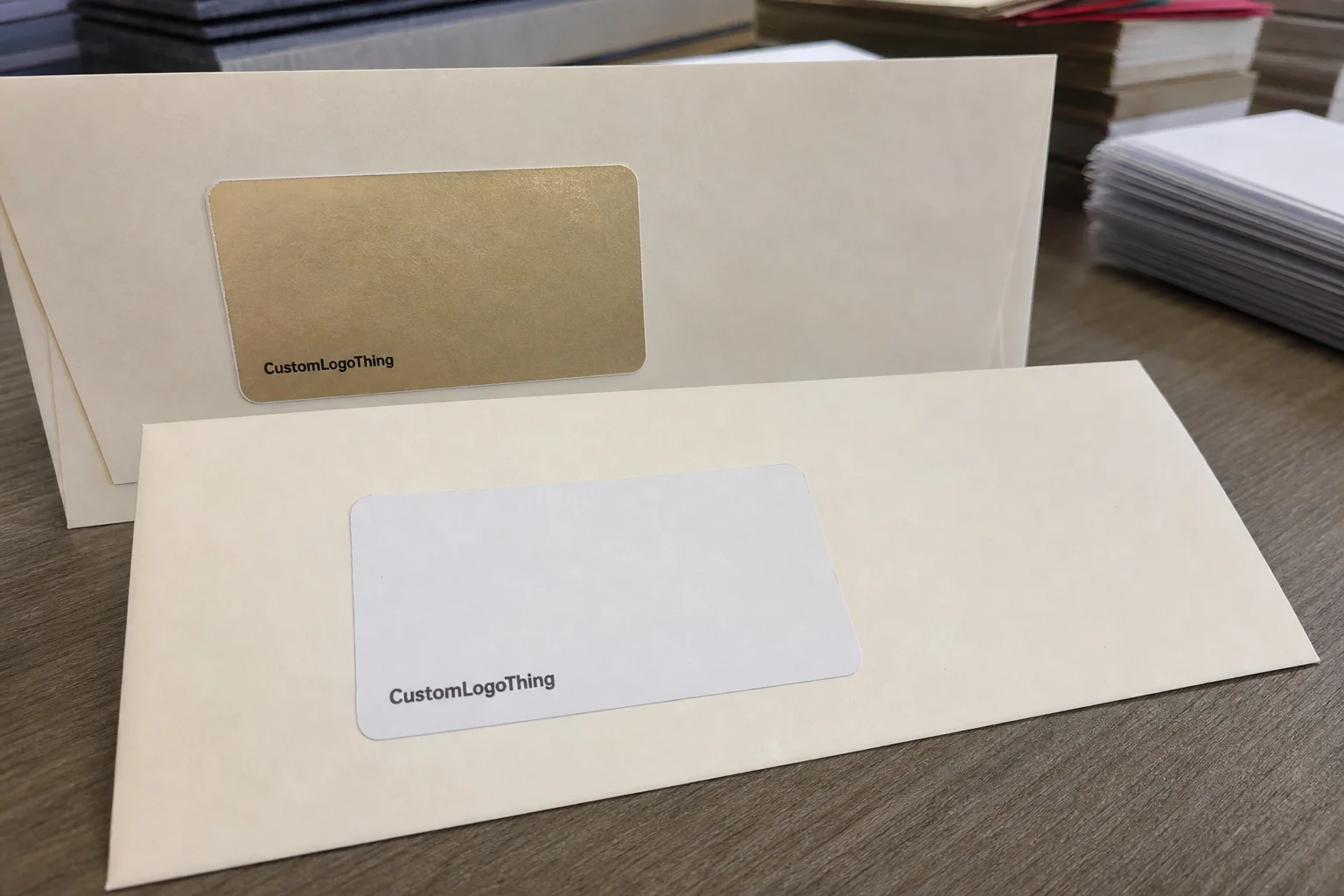
These labels sit in one of the most visible parts of the envelope. They need to carry the sender, recipient, or both, while fitting the envelope size, postal requirements, and brand style. That sounds basic. It is not. A label that is too large crowds the stamp area. A label that is too small gets buried on the envelope. A label with bad contrast looks like a production mistake, even if the file was technically correct.
From a buyer’s point of view, the main advantage is consistency. A label keeps font size, spacing, and alignment steady across the run. That matters when different people are preparing mail, or when the same job gets repeated every month with new names and addresses. It also keeps the address block from drifting across envelope stock that may vary in shade or texture.
There is a practical cost angle too. Hand-addressing might work for a dozen invitations. It stops working once the mailing becomes a process. At that point, the labor cost and error rate start to matter more than the unit price of the label itself. If the same sender information is used over and over, a printed label usually beats reprinting pre-addressed envelopes every time the recipient list changes.
Good labels also help protect deliverability. Clear typography, enough contrast, and a stable layout make postal scanning and manual reading easier. That does not magically fix bad data, but it does remove one more variable. Mail already has enough failure points. There is no reason to add another.
A tidy label rarely gets attention. A crooked one gets noticed immediately.
That is why buyers should treat the label as part of the mailing system, not a side accessory. It has to fit the envelope, survive handling, and look intentional under real-world conditions, not just in a mockup.
Production Process: From Artwork to Approved Proof
The workflow is usually simple on paper. You send artwork, the supplier builds a proof, you approve it, and production starts. In practice, the quality of the brief determines how many rounds that takes. A clear request should include the label dimensions, envelope size, whether the piece is return-address only or recipient-address only, the final copy, and any brand rules that matter for the job.
If the order includes variable data, the file setup matters just as much as the design. Names, street addresses, city lines, zip codes, and merge fields should be checked before the first proof goes out. A clean CSV is faster than a messy spreadsheet with merged cells, hidden columns, and random punctuation. Suppliers can work with a lot of things. They cannot read minds, and they definitely cannot correct bad data without causing delays.
For static addresses, production is straightforward. For personalized runs, the proof has to show how different records will look in the final layout. That is where spacing issues show up. Long names can wrap badly. Apartment numbers can push the line length over the edge. A business name may need a slightly smaller type size than the mockup suggests. If the supplier does not show those edge cases, ask for them.
The most common delay is the proof stage. Missing logos, low-resolution files, vague color instructions, and unclear positioning all add revisions. If the project needs to stay on schedule, the fastest path is not rushing the press. It is sending finished artwork, approving quickly, and limiting late-stage changes. That is boring. It also works.
One detail buyers often overlook is the relationship between the label and the rest of the print program. If the envelope, insert, and label all need to feel like one system, keep the type treatment and color logic consistent across the order history. That is where Custom Labels & Tags become useful beyond the single job in front of you.
Cost, Pricing, and MOQ: What Changes the Quote
Pricing for personalized envelope labels is driven by more than quantity, but quantity is still the biggest lever. Size, stock, finish, number of colors, shape, adhesive type, and whether the job runs as a simple static print or variable-data order all move the number. A 5,000-piece one-color paper label is a very different order from a 250-piece short run on synthetic stock with custom die-cutting and a specialty adhesive.
MOQ matters because setup costs do not disappear just because the order is small. Proofing, prepress, press setup, trimming, inspection, packing, and administrative time all need to be covered. That is why a small order can look expensive on a per-unit basis. You are paying for the work that makes the run possible, not just the label stock itself.
Quoted price can also hide structure differences. Some suppliers bundle proofing and shipping. Others treat them as separate line items. Some include one revision. Some do not. A quote that looks cheap at first glance can become the more expensive option once freight, die fees, rush charges, or extra corrections are added. Compare like with like. Otherwise the estimate is just decoration.
Typical price ranges are broad, but some useful benchmarks help. A basic paper label might fall around $0.12-$0.22 per unit at 5,000 pieces. A synthetic or laminated version often lands closer to $0.18-$0.35 per unit. Short runs can be much higher because the setup cost gets spread across fewer pieces. Setup fees commonly run from $35-$125, depending on artwork complexity and whether variable-data files need to be built or cleaned up.
| Option | Best For | Typical Cost Signal | Tradeoff |
|---|---|---|---|
| Paper label, matte finish | Office mail, invoices, donor letters | Lowest unit cost in medium and high quantities | Less durable in moisture or rough handling |
| Synthetic film label | Storage, shipping, variable temperatures | Higher material cost | Better resistance, but usually pricier |
| Writable label stock | Small batches, partial hand completion | Moderate cost | Less premium print appearance |
| Custom shape or specialty adhesive | Brand-led mailings, textured envelopes | Highest setup burden | More design control, more cost |
For buyers with repeat mailings, the first order often looks worse on paper than the second. That is normal. The initial run pays for setup and proofing. Later runs tend to be cleaner and cheaper because the approved file already exists and the supplier can reuse production settings. That is where custom label products start paying back in a way that is easy to miss if you only compare the first quote.
If sustainability is part of the brief, ask for specifics. “Eco-friendly” is not a spec. Ask whether the paper is FSC-certified, whether chain-of-custody documentation is available, and whether the adhesive or liner affects recyclability in your region. If the mailing will travel through rough handling or variable temperatures, ask for test language rather than marketing language. Standards references such as ISTA are more useful than broad claims that something is “durable enough.”
Choosing the Right Material and Finish
Material choice should follow the mailing environment. A coated paper label is usually enough for office envelopes, internal mail, invoices, and most donor letters. It prints cleanly, reads clearly, and keeps costs under control. A synthetic film makes more sense if the labels may sit in storage, face moisture, or move through a tougher logistics chain before they reach the envelope.
Adhesive performance is where a lot of buyers get surprised. A standard office label may work perfectly on smooth paper stock and fail on textured or recycled envelopes. Cold storage can also affect bond strength. If the envelope has a rough, fibrous, or uneven surface, ask for an adhesive that is designed for that substrate instead of assuming a generic label will hold the same way.
Finish affects both readability and tone. Matte is usually the safest option because it limits glare and looks clean under office lighting. Gloss can give a more polished look, but it can also create reflections that make the address harder to scan at a glance. Writable stocks make sense when someone still needs to add notes by hand, but they usually give up some of the visual sharpness of a fully printed piece.
The output method matters too. Some labels are meant to be printed in-house on laser or inkjet equipment. Others are produced fully finished by the supplier. Those are not interchangeable. A stock that handles one process well may perform badly in the other. If the order needs to run on demand in an office setting, compatibility is a requirement, not a nice-to-have.
Here is the simplest way to choose: keep it basic for standard office mail. Step up to better stock, better adhesive, and a more protective finish when the label is being used as part of a premium mailing, a branded package insert, or a workflow that will see rough handling. Samples are cheap. Reprints are not.
Turnaround Time and Production Steps to Plan Around
Production time is more than press time. A real schedule includes proofing, approval, printing, drying or curing if the process needs it, inspection, packing, and shipping. For many label jobs, the full cycle lands around 5-10 business days after proof approval. Specialty materials, custom die work, or peak-season demand can push that out further.
If a mailing has a fixed date, build the calendar backward from the drop date, not forward from the quote date. That avoids the usual trap where revisions, internal approvals, and freight eat the cushion one day at a time. It does not take much to lose a week. A missed logo file, a late approver, and a carrier delay are enough to do it.
The fastest jobs are usually the dullest. Final artwork, clean recipient data, a single point of approval, and no late spec changes. That combination cuts the number of decision points, which is where projects slow down. Nobody complains about a boring approval cycle when the order ships on time.
Peak periods can affect lead time too. End-of-year mailings, campaign spikes, and seasonal promotions tend to compress capacity. Unusual finishing or specialty materials can add their own delays. Even transit time can become the issue if the shipment has to cross a long distance or a carrier is backed up. Ask about those assumptions before the order is placed, not after the ship date has already moved.
For recurring campaigns, save the approved proof and production notes. The second and third runs are usually smoother because the dimensions, address format, and finish have already been locked in. Reorders should not feel like a fresh experiment every time. They should feel routine. That is the whole point of building a repeatable label program.
Common Ordering Mistakes That Lead to Reprints
The most expensive mistakes are rarely dramatic. They are usually boring and preventable. Low-resolution logos, tight text that looked fine on a screen, missing bleed, and address blocks packed too close to the edges all create problems during print or trimming. If the file is crowded before production starts, it will not become elegant on press.
Size errors are just as common. A label that fits a #10 envelope may not work on a smaller invitation envelope without crowding the stamp area or running into the edge. On larger mailers, the same file can look oddly small and lose balance. The envelope format should drive the label dimensions, not the other way around.
Variable-data jobs need extra attention. Do not check the first few records and call it done. Review long names, short names, business names, apartment lines, and anything with special characters or unusual punctuation. Bad data can survive a quick skim and still create a reprint. It usually does.
Proofing is the cheapest place to catch these problems. Review spelling, line breaks, logo placement, postal formatting, and the actual recipient list. If the supplier sends a proof that only shows the cleanest possible record, ask for a few awkward examples. The awkward ones are the ones that break the layout.
One simple quality-control habit saves a lot of grief: print or sample the label against the actual envelope stock before the run is released. Screen previews do not show paper shade, contrast, texture, or how the address block reads at arm’s length. A file can look perfect on-screen and still fail when it hits real paper. That is not uncommon. It is routine.
Next Steps Before You Request a Quote
Before sending a request, gather the final address copy, quantity, envelope size, and whether the order needs sheets or rolls. If the mailing includes multiple recipients, include the variable-data file in a clean format. If you already know the finish you want, say so. The more complete the brief, the less time gets wasted interpreting it.
Ask for a proof that shows actual spacing, not just a polished logo mockup. You want to see the address block in relation to the stamp area, the logo, and the edge of the envelope. If the supplier is good at this, the proof should make any bad fit obvious. If it does not, ask for a revision before approving anything.
It also helps to request more than one quote on the same spec. That makes unit cost, setup charges, finish options, and turnaround easier to compare. If the numbers are wildly different, the reason is usually in the details: stock, adhesive, trim, freight, or how many revisions are included.
Used properly, personalized address labels for envelopes are a repeatable production tool. They keep mail readable, help the brand look organized, and reduce the amount of manual cleanup a team has to do before an envelope leaves the building. That is a practical win, not a marketing slogan.
What size personalized address labels for envelopes should I choose?
Start with the envelope size and the space available for the address block, then leave margin so the label does not crowd the logo or stamp area. For standard business envelopes, a compact rectangular format usually works best because it stays readable and prints efficiently. If the layout is custom, request a proof at actual size before production.
Are personalized envelope address labels better than printing directly on the envelope?
Labels are usually better when you need flexibility, quick reorders, or a clean way to update addresses without replacing envelope inventory. Direct printing can look more integrated, but it is less forgiving if the address list changes or the envelope stock varies. For short-run mailings and recurring campaigns, labels often give a better balance of speed, cost control, and consistency.
How much do personalized address labels for envelopes cost in bulk?
Bulk pricing usually drops as quantity rises, but the final rate depends on size, stock, print colors, and finish. Setup fees and shipping can change the real unit cost, especially on smaller runs. The cleanest comparison is a quote at multiple quantities so you can see where the per-label price becomes more efficient.
How long does it take to produce custom address labels for envelopes?
Most timelines depend on proof approval, print method, finishing, and shipping distance. Orders move faster when artwork is final and the approval step is handled quickly. If the labels are tied to a launch or mailing date, build in extra time for revisions and freight delays.
What should I send to get an accurate quote for personalized address labels for envelopes?
Send the label size, quantity, print colors, finish preference, and whether you need sheets or rolls. Include the final address copy or variable-data file if the order covers multiple recipients. A clear sample or template helps the supplier quote correctly and lowers the chance of rework.