The fastest way to waste packaging budget is to approve a mockup that looks balanced on a screen and then discover the logo prints too low, too tight, or too close to a fold on the real bag. A small retail Paper Bags Logo placement guide matters because compact bags leave very little room for error. Handles, top folds, glue seams, and gussets all take space away from the printable area, and a logo that looked generous in a proof can feel cramped the moment it hits paper.
For a boutique, gift shop, salon, cafe, or pop-up, the goal is not to make the bag flashy. The goal is to make it readable, durable, and easy to reorder without surprise costs. Small bags do best with clear hierarchy and restrained artwork. One strong mark, enough margin, and a layout that survives folding and handling will usually outperform a crowded design with too many elements competing for attention.
That practical mindset saves money in a few different ways. It reduces proof revisions, keeps print costs under control, and prevents the common mistake of approving a design that only works in a perfect render. A bag should read well in the hand, on a counter, and from across a checkout line. If the placement cannot do that, the design is too fragile for production.
"If the logo only looks right when zoomed in, it is probably too tight for production."
For fiber sourcing and certified paper claims, many buyers use FSC language as a reference point. If you need the baseline terminology suppliers often quote, FSC is the simplest place to verify the wording.
Small retail paper bags logo placement guide: what actually matters
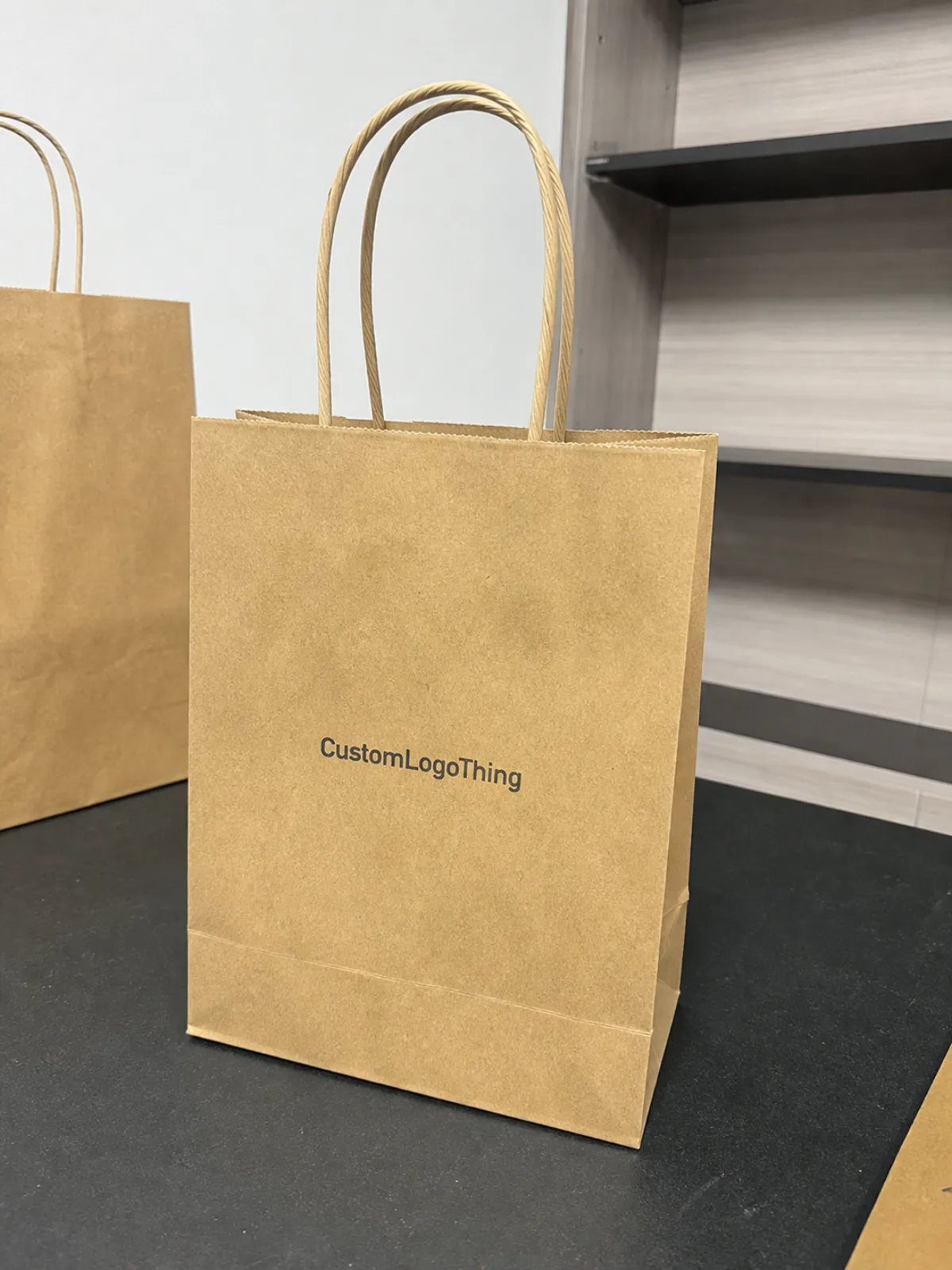
Logo placement is not just the position of an image on a flat template. It is the relationship between the artwork and the bag's real structure: panel width, fold lines, handle attachment points, gusset depth, and bottom construction. On a screen, everything appears square and predictable. On a finished bag, the useful area shifts once the paper is folded, glued, and filled.
Small retail bags are less forgiving than larger shopping bags because the printable face is tighter. A 5 x 8 in bag behaves differently from a 10 x 13 in bag even if the artwork file never changes. The smaller the bag, the more important it becomes to keep the logo simple, centered with intent, and surrounded by enough blank space that it can breathe. Too many extra words or decorative marks can make the bag feel busy instead of branded.
From a buyer's perspective, three things matter most: visibility, cost, and proofing risk. A logo placed too low may disappear behind the counter or below the line of sight once the bag is carried. A logo placed too large may collide with handles or folds. A logo placed on the wrong stock may lose contrast, especially on natural kraft. The right placement is the one that still reads cleanly after the bag is folded, filled, held, stacked, and shipped.
That last point matters more than most mockups suggest. A flat proof cannot show how a paper bag behaves once the top fold stiffens, the handles pull the panel inward, or the gusset changes how the side view reads. Buyers who account for those variables usually get cleaner results and fewer reprints.
How logo placement works on small paper bag panels
Every paper bag gives you several usable zones: the front panel, back panel, side gussets, and bottom. The front panel is usually the strongest location for the main logo because it faces the customer at checkout and remains visible while the bag is being carried. The back panel can carry a website, a short brand line, or a secondary mark. The gussets are useful for subtle repetition, but they should support the design rather than carry the whole brand. The bottom is rarely a good choice for visibility because it spends most of its life on a counter or floor.
Handle style changes the safe area at the top edge. Twisted paper handles, flat handles, and ribbon handles each attach differently, and that affects how close artwork can sit to the fold. On compact retail bags, a sensible rule is to keep the main logo at least 10-15 mm below the top fold. If the handle attachment is bulky, or if the bag has a stiff rolled top, increasing that clearance to 15-20 mm usually protects the print from looking crowded. The extra space is not wasted; it keeps the logo from feeling pinched.
Most small-bag programs are strongest with front-only printing. One logo. One side. One clear message. That is easier to proof, less likely to drift across reorders, and usually the lowest-risk path for budget and timing. A front-and-back layout can work when the brand needs visibility from both sides of the counter, but the second panel should earn its place. Wraparound art and heavy side-panel graphics are better reserved for larger bags or for brands that deliberately use pattern as part of the identity.
- Front panel: best for the primary logo and the clearest retail read.
- Back panel: useful for a website, tag line, or second brand touchpoint.
- Side gussets: good for small repeats or supporting marks, not for the main message.
- Bottom panel: printable on some runs, but weak for shopper visibility.
Small bags also need a stricter visual hierarchy than larger shopping bags. One main logo is usually enough. Add a second line of copy only if it serves a purpose, such as a website or short descriptor. Once the layout starts stacking a crest, icon, wordmark, and slogan together, the bag can drift from polished packaging into crowded handout territory.
Structure matters too. Bags with reinforced tops, heavier handles, or thicker board inserts need more margin near the fold. Softer kraft stocks can tolerate a little more visual weight, but they also show fine detail less cleanly. There is no single placement formula that works for every bag; the correct layout depends on the exact stock and the way the bag is built.
Logo size, artwork, and bag specs that change the result
Logo size is not a design choice in isolation. It has to match the bag width, gusset depth, handle style, paper weight, and print method. A 6 in wide bag can support a bold centered mark. A 4 in wide bag cannot. As bags get smaller, the relationship between logo size and blank space becomes more sensitive, and a design that feels confident on a large tote can start to look overworked on a small retail bag.
A useful starting point is a logo that occupies about 35-55 percent of the front panel width. That is not a rule, just a practical range that keeps the art legible without forcing it into the edges. A wide wordmark can stretch farther across the panel. A round icon usually needs more breathing room. A tall narrow logo often looks better in the upper-middle zone than stretched low across the panel. The exact shape of the artwork matters as much as the size.
File quality matters even more than many buyers expect. Vector files are the safest option because they scale cleanly at print size. AI, EPS, and print-ready PDF files are the usual working formats. Low-resolution JPG and PNG files are where trouble starts, especially when the logo uses thin lines or small text. On textured kraft paper, anything below 0.35 mm line weight can become unreliable, and copy below 7 pt often fills in or loses crispness. Fine details that look elegant on a monitor may disappear once the ink lands on paper fibers.
Paper stock changes the visual result more than most people anticipate. White paper gives the cleanest logo read and supports multicolor work well. Natural kraft creates a warmer, more understated look, but light inks can sink into the surface and small details can soften. Matte coatings reduce glare and can make the bag feel more refined. Gloss or semi-coated finishes tend to sharpen contrast, but they also make registration and alignment errors easier to see. Each stock has a personality, and the placement should respect it.
Material expectations also affect the supplier conversation. Buyers who want certified fiber language, recycled content claims, or compostable rhetoric need to separate marketing copy from actual material specs. A claim should always be tied to the exact paper basis weight, coating, and handle construction, not just a generic sustainability sentence. That keeps the order honest and avoids confusion when the bag arrives.
If you want a reference point for general packaging terms and paper-related language, Packaging.org is useful for comparing common industry phrasing without guessing from a sales sheet.
| Placement option | Best use | Typical cost impact vs front-only | Main tradeoff |
|---|---|---|---|
| Front panel, one color | Simple retail branding, strongest value | Baseline | Clean, but limited visual drama |
| Front + back | Boutique bags, loyalty messaging, stronger carry visibility | +5% to +12% | More print area and more proofing attention |
| Front + gusset | Brands that want a side-view impression at checkout | +8% to +15% | Gusset art can look cramped on small sizes |
| Full wraparound | Pattern-heavy branding or premium presentation | +15% to +35% | Higher setup risk and more chances to misread the dieline |
Oversizing is one of the easiest ways to make a bag look less expensive than it is. If the artwork pushes too close to the top fold or panel edges, the logo can feel clipped even when the file is technically correct. The better result is usually a logo that feels deliberate, not loud. Buyers often ask for the largest possible artwork and then dislike the outcome because the bag has lost proportion.
Cost and pricing factors for logo placement
Logo placement affects price through a handful of predictable variables. Print colors are the most obvious. One-color black or deep green on kraft is usually the most economical route. Two-color work adds setup and press complexity. Full-color CMYK can look excellent, but it needs tighter file control and generally costs more. The number of printed sides matters too. Front-only is cheaper than front and back, and both are usually less expensive than a full wraparound treatment.
Bag size influences unit cost, but not always in the way buyers expect. A smaller bag can still carry a meaningful setup charge because the production method, stock, and handle style may be the same as on a larger format. That is why low order quantities can feel expensive. The fixed setup costs are spread over fewer units, which pushes the per-bag price up. If a proof comes back with a placement change after approval, that can add another round of work and another charge.
For smaller retail programs, the simplest path is usually the most efficient one. A clean front-panel print often gives the best mix of cost, readability, and turnaround time. Extra sides, specialty inks, and decorative finishes can be worthwhile, but they should solve a real brand need rather than just add visual noise. Most small paper bags do not need a complicated print schedule. They need a logo that is easy to read at arm's length and cheap enough to reorder without hesitation.
- Setup charges: often fixed, so they hit low quantities harder.
- Print colors: every additional color raises setup and run cost.
- Dieline changes: repositioning artwork can trigger a new proof cycle.
- Special finishes: foil, embossing, spot UV, and soft-touch coatings add cost quickly.
- Sampling: useful for checking real scale, but multiple rounds add time and expense.
For a rough buying frame, a simple one-color front-panel print on a small custom paper bag might land around $0.18-$0.28 per unit at 5,000 pieces, depending on stock, handle style, and print coverage. Add extra colors or additional print sides, and the price moves up. At lower quantities, the unit cost can rise enough that a cleaner layout becomes the better financial decision.
Proof revisions are the hidden cost many buyers underestimate. If the first layout is wrong because the logo sits too close to a fold or handle, the order can stall while the art is corrected. A careful supplier will flag those risks early. A careless one will approve a weak layout and leave the buyer to discover the issue only after production. That is not quality control. That is an expensive shortcut.
Production steps and timeline for a small bag order
The workflow is straightforward, but each step depends on the artwork being ready. First comes the quote and spec review: bag size, paper stock, handle type, print colors, quantity, and target ship date. After that, the supplier checks the artwork against the dieline. Then comes proofing, sample approval if needed, production, packing, and freight. Skipping any of those steps usually creates more delays later.
Typical lead times vary with complexity. A clean one-color order with a standard bag size can often move in 12-15 business days after proof approval. Custom sizes, multi-color work, premium finishes, or revised handles need more time. Sampling stretches the schedule further. Freight also deserves its own buffer, because a bag that prints on time can still arrive late if shipping is cut too close to the launch date.
The most common delay points are not mysterious. Low-resolution artwork, missing font outlines, vague placement instructions, and changes after proof circulation are the usual suspects. Another problem shows up when buyers think in flat graphic terms instead of production terms. A bag is not a poster. It has folds, seams, handle anchors, and glue zones, and each one affects the usable area.
There is also the shipping reality. If the bags are tied to a store opening or seasonal launch, plan from the date you need them in hand, not the date printing is supposed to finish. Freight and receiving can absorb more time than people want to believe. The mindset used in ISTA testing applies here too: design for handling, stacking, and transit, not just the perfect proof.
A few minutes of review at the dieline stage can prevent multiple rounds of correction. Check the logo size against the real panel. Check handle clearance. Check the safe margin around the top fold. Check whether the side view still looks balanced. That small amount of discipline usually saves more time than any rush fee can.
- Confirm bag dimensions and handle style.
- Choose the print panels before artwork cleanup begins.
- Set the logo scale and safe area on the dieline.
- Approve a proof only after checking folds, gussets, and top clearance.
- Allow time for freight and a backup reprint window if the launch date is fixed.
Common logo placement mistakes to avoid
The bad results follow familiar patterns. The same errors come up again and again, and none of them require advanced design skill to avoid. They are mostly proofing mistakes and assumption problems. Catch them early and the bag usually looks far better.
- Logo too close to the top fold: the artwork feels squeezed by the handle zone or disappears when the bag is filled.
- Ignoring the side gusset: the front panel looks fine, but the bag reads awkwardly from the side.
- Treating the bag like a flyer: paper bags are structural objects, so folds and seams matter.
- Oversized artwork: the logo clips against the handles or edges and loses polish.
- Approving a mockup without scale checks: a centered image is not the same as a production-safe layout.
- Using tiny text: websites, tag lines, and legal copy become hard to read once printed at bag size.
Most ugly bag prints are not caused by a weak brand. They usually come from poor placement decisions. The logo may be strong, the paper may be good, and the print process may be fine, yet the final result still feels off because the art ignores the bag's real geometry. That is why the dieline matters more than the mockup.
Another issue is confusion between design space and production space. Designers often work inside a neat rectangle. Production has to work around folds, glue seams, handle attachments, and print tolerances. Those are not interchangeable. If the supplier cannot explain the safe area in plain language, the proof probably needs another round of correction.
The safest first move is to keep the initial version simple. Test the front panel. Confirm the logo reads at arm's length. Then decide whether the back panel or gusset deserves a role. That order keeps the decision grounded in how the bag will actually be used, which is a better test than a polished render.
Next steps for cleaner proofs and smarter ordering
The most useful pre-quote checklist is short. Confirm the bag dimensions. Pick the print panels. Decide whether the logo should stay one color or move to full color. Request the dieline. Check the safe area around the handle and top fold. That sequence catches most avoidable mistakes before they become expensive.
Comparing two or three placement options side by side usually makes the tradeoffs obvious. A front-only version, a front-and-gusset version, and a front-and-back version will often show which layout gives the best mix of clarity and cost. The first mockup that looks acceptable is not always the right one to buy. Sometimes the most restrained version produces the strongest brand read and the least production risk.
Before approval, review the design at the actual bag size rather than on a large monitor. Check contrast. Check margins. Check handle clearance. Check whether the logo still reads from across the counter. If a mark only makes sense when enlarged on screen, it is usually too detailed for a small retail bag.
That is the practical heart of a Small Retail Paper Bags logo placement guide: keep the artwork simple, respect the dieline, and choose the placement that survives real use instead of just looking polished in proof. Do that, and the bags are far more likely to print cleanly, arrive on schedule, and feel like they were planned with the product in mind.
How do I choose the best logo placement on small retail paper bags?
Start with the front panel, since it gives the clearest visibility for most retail uses. Then adjust the logo based on handle style, fold lines, and the amount of blank space the bag actually has. On compact bags, a little extra breathing room usually looks better than forcing the logo to fill every available inch.
Does printing on the gusset help with small retail paper bags logo placement?
It can help, but only if the side view matters in your store or at checkout. Gusset printing works best as a support move, not the main event. It adds brand presence, but it is easier to miss than a front-panel mark, especially once the bag is being carried or stacked.
What is the cheapest logo placement option for small paper bags?
Usually a single-color front-panel print is the lowest-cost setup. It keeps the print process simple and avoids extra panel charges. If you are trying to hold down unit cost, skip extra sides, extra colors, and late-stage changes.
How long does a custom small retail paper bags order usually take?
Simple orders often move faster, but proof approval still controls the schedule. A clean one-color run may ship in about 12-15 business days after approval, while custom sizes, extra colors, or sampling can extend the timeline. Freight time should also be included if the bags need to arrive by a launch date.
What file type works best for logo placement proofs on paper bags?
Vector files are best because they hold clean edges at print size. AI, EPS, and print-ready PDF files are the usual choices. If all you have is a raster file, make sure it is high resolution and does not depend on tiny text or fine detail that will disappear on paper.

