A logo can look flawless on a screen and still fall apart on a beanie. That gap is why Knit Hats With Logo artwork file setup matters: the artwork is not just uploaded, it is translated into stitches, yarn tension, patch construction, and a proof a production team can actually build.
For buyers, the difference shows up quickly. A brand file is made to impress. A production file is made to survive knit gauge, stitch density, color limits, size constraints, and the reality that fine detail loses definition on a textured surface. Get the handoff right and quotes move faster, proofs need fewer revisions, and the finished hat looks intentional. Get it wrong and even a small order can stall out in redraws, back-and-forth emails, and setup charges that were not in the first estimate.
What Knit Hats with Logo Artwork File Setup Actually Means
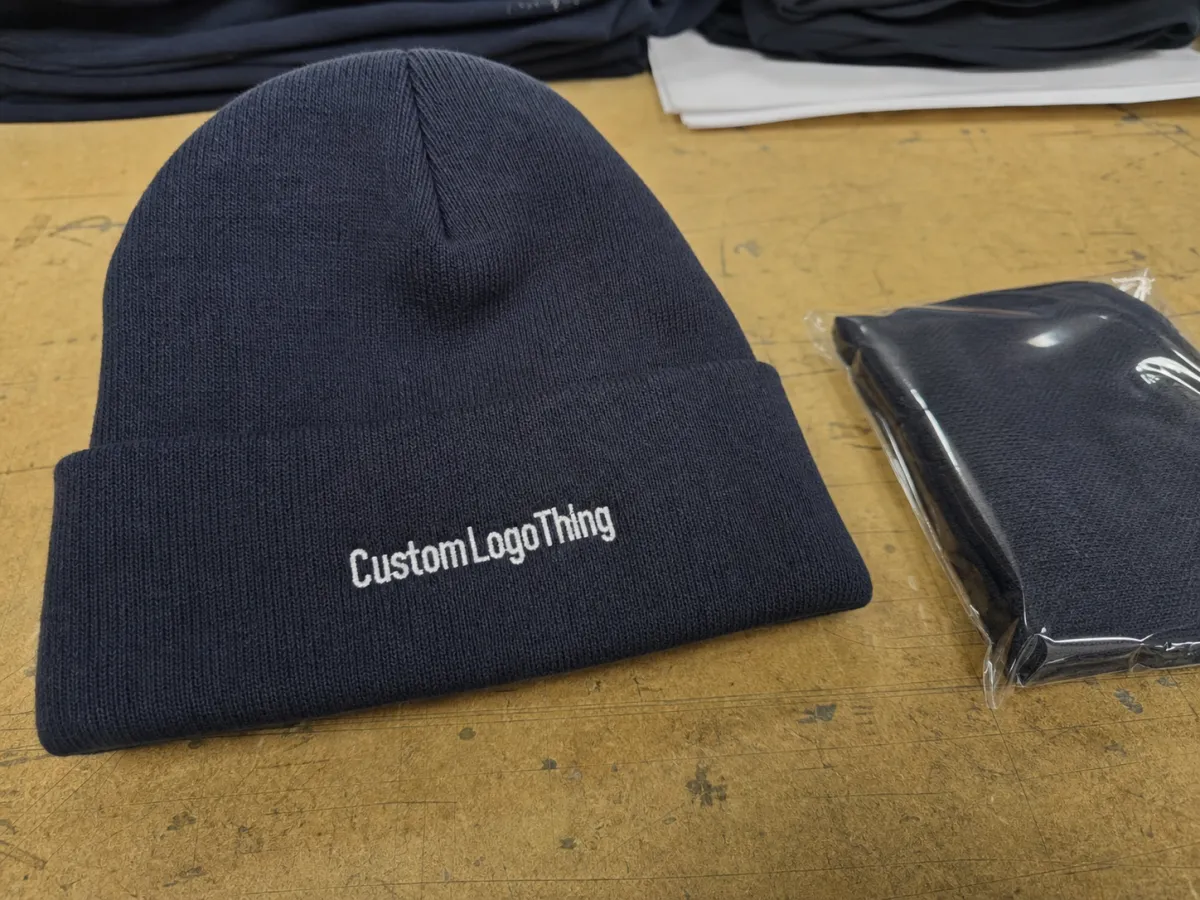
Most people hear “artwork setup” and picture one file upload. In production, that is only the starting point. Knit Hats with Logo artwork file setup is the process of preparing a logo so it can be converted into embroidery, jacquard knit, woven patches, leather patches, or another decoration method without guesswork. The file has to do more than look clean. It has to make sense on a stretchable, textured surface that behaves nothing like paper or a display panel.
That difference matters because beanies compress artwork in ways buyers often underestimate. Thin lettering can close up. Small counters can disappear. Gradients can blur together. A delicate outline may vanish once yarn or thread hits the knit surface. Good setup reduces interpretation. It tells the supplier what the design is, where it sits, how large it should be, and which parts need simplification before a sample or proof is built.
A polished brand asset answers one question: what does the logo look like? A production-ready file answers a harder one: how do we make this on a knit hat at this size, in this decoration method, without creating a problem on the line? That is not cosmetic. It affects proof accuracy, production speed, unit cost, and the quality of the final hat.
Practical rule: if the file only works when someone “uses their best judgment,” it is not ready yet.
How the Artwork File Moves From Logo to Finished Beanie
The path from logo to finished beanie usually follows a familiar sequence. First, the supplier checks the order details: hat style, decoration location, quantity, and target date. Then they decide which production method fits the artwork. A simple mark may be embroidered on the cuff. A more detailed logo may be better as a woven patch. A bold repeat pattern may belong in the knit itself.
That decision is where experience shows up. The goal is not to make the art prettier. The goal is to make it readable once the material, stitch count, and surface texture start working against it. Small text may need to be enlarged. Thin strokes may need to be thickened. Low-contrast color pairs may need stronger separation. If the logo includes a badge, shield, or emblem, the edge often needs simplification so it does not blur into the fabric.
Then comes proofing. The buyer reviews a mockup or digitized proof, checks placement, confirms colors, and approves the file for production. This stage catches most problems early. A proof that needs three rounds of edits usually points to a file issue, not a machine issue.
A good proof does not surprise anyone. It confirms the decision before material turns into labor.
There is another detail that matters: the decoration method changes what “good” means. Embroidery can hold a simpler logo beautifully if the stitch count stays manageable. Jacquard knit can integrate the design into the hat, but it usually wants cleaner shapes and fewer colors. Woven patches handle detail better, yet they add a separate construction step and a sew-on application point. A production team is always balancing appearance against manufacturability.
Artwork Specs That Decide Stitch Quality and Color
The strongest files usually start with the right format. Vector artwork in AI or EPS is still the cleanest choice because the edges stay sharp at any size. Editable PDF files can work too if the art is built properly. A transparent PNG is useful as a visual reference, especially when the supplier needs a quick read on layout, but it should not be the only file unless the design is extremely simple.
Details matter more than most buyers expect. Bold shapes survive better than hairline strokes. Small text can collapse unless it is scaled up. Shadows, gradients, and soft fades often need to be removed or rebuilt, because yarn and thread do not reproduce them the way a monitor does. If the logo sits on a cuff, there is even less room for error, since cuff placement is small and highly visible.
Color is another place where expectations need to stay practical. Brand color matters, but exact visual matching is not always the real target. Thread and yarn have their own libraries, and the key questions are contrast, consistency, and whether the colors still read correctly after the artwork is translated. A supplier may map brand colors to thread equivalents or Pantone references, but a clear proof matters more than a perfect monitor match.
These specs usually make the biggest difference:
- Vector base for clean edges and easy resizing.
- Outlined fonts so text does not break when opened elsewhere.
- Simple shapes that hold up under knit gauge limits.
- Clear placement notes for front-center, cuff, or side placement.
- Color callouts tied to brand references or thread equivalents.
There is a practical limit to how much detail the product can carry. Fine lines, tiny negative spaces, and multi-step gradients may look sharp in a brand system and still fail on a hat. Buyers who understand that limit usually get cleaner proofs and fewer redesigns. Buyers who ignore it often end up paying for it later in setup time.
For orders that include retail packaging or inserts, the same discipline applies beyond the hat itself. Paper labels, hang tags, and carton markings should follow the same file logic: clear, accurate, and easy to reproduce. Different component, same production problem.
Production Steps and Turnaround for Custom Knit Hats
Once the artwork is accepted, production usually follows a predictable chain: intake review, digital cleanup, proof creation, buyer approval, scheduling, production, finishing, and dispatch. The sequence sounds simple, but the calendar is shaped by what happens before the first machine starts. A clean file can move quickly. A messy file can sit in revision while the order waits its turn.
Timelines depend on more than decoration time. Revision count matters. Sample requests matter. Stock availability matters. Busy season matters. For standard runs, suppliers often quote roughly 12 to 15 business days from proof approval to completion, but that number can move if the design needs redraws or if the hat style is temporarily out of stock. Rush jobs are possible in some cases, but only if the artwork is already production-ready and approvals move fast.
It also helps to separate manufacturing time from shipping time. A quote may look quick on paper and still miss the target delivery date if transit was not included in the planning. That is especially true for orders going into retail, events, or seasonal campaigns. Buyers often focus on decoration speed and forget that cartons still have to move.
If your order needs individual polybags, retail-ready inserts, custom labels, or special carton labeling, say so early. Those requests affect packing labor, materials, and sometimes the shipping method itself. The best timelines are built from the whole order, not just the hat decoration step.
The fastest orders usually share one trait: the buyer gave the supplier everything needed on day one. Final logo file, quantity, placement, finish, packaging needs, and deadline are all clear. Speed is rarely magic. It is usually fewer unknowns.
Pricing, MOQ, and Quote Factors That Change Unit Cost
Pricing for knit hats is shaped by a cluster of variables, and artwork setup is one of them. Number of colors, decoration method, logo size, order quantity, and cleanup requirements all affect the quote. A simple one-color logo on a standard beanie is a different job from a multi-color design with tight registration and custom packaging. That difference shows up in both setup time and unit cost.
MOQ, or minimum order quantity, is another major factor. Lower minimums usually cost more per unit because the fixed setup work is spread across fewer hats. Larger runs often unlock better pricing because prep cost gets diluted. In practice, many custom knit hat programs start around 48 to 100 pieces, while more competitive pricing often appears at 250, 500, and 1,000-plus units. The exact breakpoints vary by decoration method and factory capacity.
| Decoration option | Best use | Typical setup needs | Approximate unit range at mid-volume |
|---|---|---|---|
| Embroidery on cuff | Simple logos, names, short marks | Digitizing, stitch count review, color match | $4.50-$7.50 |
| Jacquard knit logo | Integrated artwork, team branding, repeat patterns | Artwork simplification, knit chart setup | $5.50-$9.00 |
| Woven patch | Detailed logos, small text, crest-style art | Patch art cleanup, sew-on placement proof | $6.00-$10.00 |
| Leather or faux leather patch | Premium look, strong contrast, short logos | Patch layout, edge style, attachment method | $5.75-$9.50 |
Those numbers are broad bands, not promises. They are useful because they show direction. A clean file usually lands in a more predictable quote range. A messy file may need cleanup, redraws, or extra proof rounds, and that can add labor before the first hat is made. Clean setup does not only save money; it makes the quote easier to trust.
There is also a subtle cost issue that buyers miss: design complexity can force a different decoration method. A logo that looks affordable as an embroidered mark may be too detailed for stitch-based execution and need a patch instead. That shift can change the look, the price, and the timeline all at once.
Common Artwork File Mistakes That Delay Orders
The most common mistake is also the most avoidable: sending a screenshot and hoping it can serve as production art. A screenshot is only a picture of a logo. It usually hides edge quality, layer structure, and font information, which means the supplier may need to rebuild the artwork before anything useful can happen.
Other problems show up constantly. Tiny text gets lost. Thin outlines disappear. Gradients look polished on a screen and muddy on a knit surface. Files arrive with locked layers, missing fonts, or no clear color callouts. Sometimes the order form says one thing and the artwork says another, which forces more clarification between sales, design, and production teams. Every round of clarification pushes approval and manufacturing farther out.
- Low-resolution JPGs sent as final art.
- Font files missing from the package.
- No size or placement notes.
- Overcomplicated gradients or shadows.
- Artwork that does not match the order form.
There is a quieter problem too: the logo may technically be usable, but not for the method the buyer picked. A design that looks fine as a large chest print may be too detailed for a cuff patch. A knit-in logo may need fewer colors than the original brand file. That is why file readiness is not just a design check. It is a production check.
One more issue shows up late in the process: approvals from too many voices. If every stakeholder leaves separate comments, the proof can bounce around for days. Consolidated feedback usually produces a better outcome and a cleaner final file. A long chain of opinions does not make the hat better. It usually just makes the schedule worse.
Expert Tips for Cleaner Proofs and Faster Approval
If the goal is a faster proof, send more than one version of the artwork. The editable source file gives the supplier room to work, and a flat preview gives them a visual target. That combination reduces confusion because the working file and the visual reference support each other. One file shows how to edit. The other shows how it should look.
Outline the fonts before sending the art, especially if the logo uses a custom typeface or thin serif lettering. Name the colors clearly. If the brand guide uses Pantone values, include them. If it relies on internal color names, map those names to visual references. Small details like that keep the proof closer to your intent and cut down on follow-up emails.
It also helps to explain how the hats will be used. Employee gifts, retail merchandise, event giveaways, and sports fan gear do not always need the same finishing level. The supplier may recommend a different patch style, yarn weight, or label treatment depending on the use case. The more clearly the order is framed, the less likely you are to get a proof that misses the mark.
Send one clean set of edits, not five partial opinions. Consolidated feedback is usually the fastest path to approval.
Keep one eye on production limits while you edit. If a logo uses small type or fine linework, ask whether it can still be read at the actual hat size. That question is more useful than asking whether the art “looks good.” Plenty of files look good. Fewer of them survive contact with knit structure.
Knit Hats With Logo artwork file setup works best when the buyer makes the supplier’s job obvious. The supplier still has to do the technical work, but they should not have to guess the intent.
What to Do Before You Request a Quote
Before asking for pricing, gather the final logo files, confirm the quantity, choose the hat style, and decide where the decoration should sit. Those four inputs alone eliminate a surprising amount of quotation noise. If you already know whether the logo goes on the cuff, front panel, or side, the supplier can steer you toward the right method much faster.
Then add any hard requirements. Do you need Pantone matching? A specific delivery date? Retail hang tags? Custom labels? A certain carton configuration? Say it up front. A quote is only useful if it reflects the real order, and real orders are shaped by constraints. Hidden requirements are the fastest way to end up with a revised price later.
- Final logo file in vector or editable format.
- Hat style and color.
- Decoration method preference, if you have one.
- Exact placement instructions.
- Quantity and deadline.
- Any packaging or labeling needs.
If the design is still in motion, separate the “brand” file from the “production” file before you send it. That small habit avoids a common trap: a file that looks polished enough to approve internally but still needs technical cleanup before it can be made. The sooner that split happens, the more accurate the quote will be.
For buyers who care about speed and cost control, knit hats with logo artwork file setup is not admin work. It is the part that makes the rest of the order predictable.
FAQ
What file format is best for knit hats with logo artwork file setup?
Vector files such as AI, EPS, or editable PDF are usually best because they preserve clean edges and scale without quality loss. A transparent PNG can help as a reference, but it should not be the only production file if the supplier needs to edit the logo. If fonts are involved, outline or embed them so the file opens correctly on the supplier side.
Can I use a JPG for knit hat logo artwork setup?
Yes, but usually only as a reference file, not as the final production file. JPGs compress edges and can hide detail, which makes them risky for stitching or knit translation. If a JPG is all you have, ask whether the supplier can trace or rebuild the art before quoting.
How detailed can my logo be on a knit hat?
Bold shapes, clean lines, and larger lettering usually survive best on a textured knit surface. Very small text, thin rules, gradients, and shadows often lose definition once the design is translated into yarn or stitches. If the logo is complex, simplify it into a production version before requesting proof.
Why does the quote change after I send my artwork file?
The file may reveal extra setup work, like cleanup, redraws, color reduction, or layout changes. A more complex logo can increase production time and therefore raise the unit cost. Revisions after proofing can also affect pricing, especially if the original file was not production-ready.
How long does production take after artwork approval?
Production usually starts only after the proof is approved, so fast approval shortens the overall timeline. Revision rounds, sample requests, and busy production periods can add time even when the order itself is simple. Shipping speed matters too, so ask for both manufacturing turnaround and transit estimates. That is why knit hats with logo artwork file setup is worth doing before the quote, not after the proof.

