Stationery Logo Patch Beanies Digital Proof Checklist
Stationery Logo Patch Beanies Digital Proof Checklist Basics
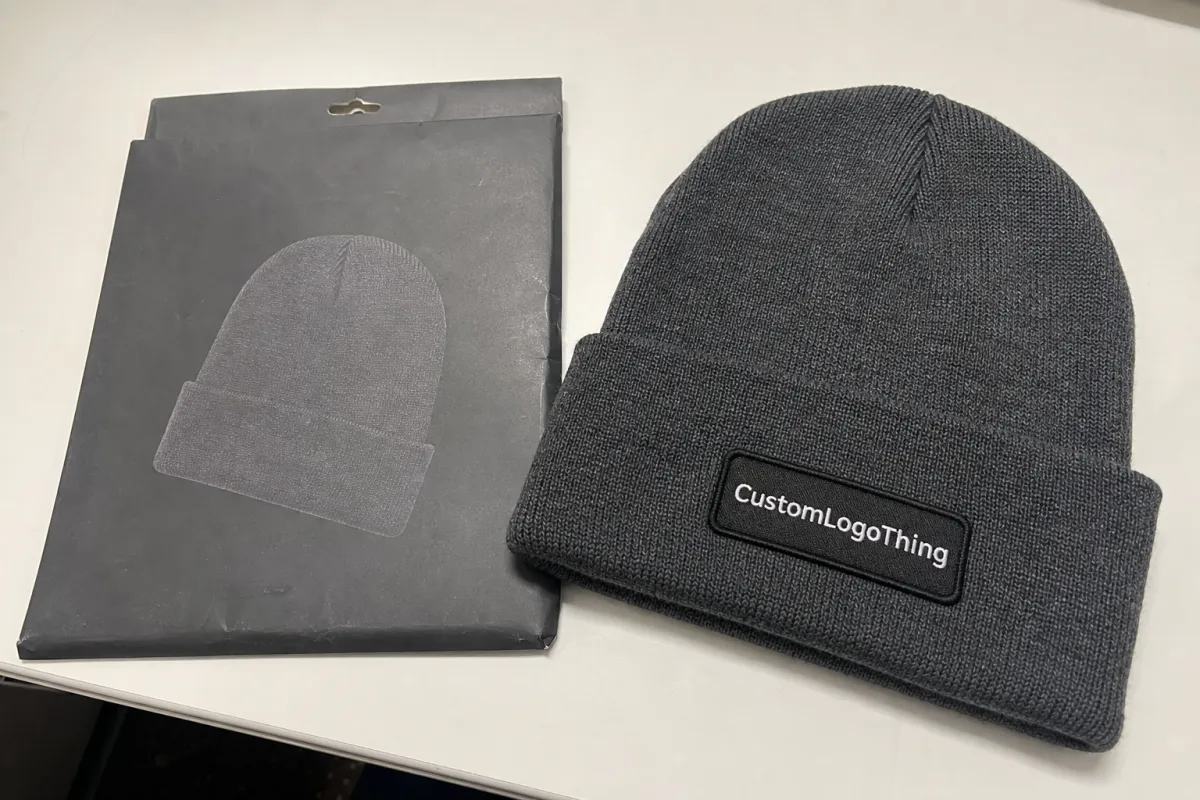
Most proof problems on beanies are not dramatic artwork failures. They are quieter than that: a patch sitting 0.25 inch too high on the cuff, a thin stationery logo line filling in, a cream thread that looks soft on screen but turns yellow against charcoal rib knit. Small errors become expensive once patches are made.
A stationery Logo Patch Beanies Digital Proof checklist gives buyers a disciplined way to approve the job before production starts. For custom logo patch beanies, the proof usually shows the beanie style, cuff shape, patch type, logo placement, colors, dimensions, stitch or attachment notes, label details, and any artwork cleanup required. Treat it as a technical approval document, not a pretty mockup.
Stationery brands need a sharper proofing eye than many merch buyers. Paper goods logos often live in fine detail: small serif lettering, wax-seal inspired marks, delicate monograms, botanical line art, hairline borders, and soft brand colors. Those details can be beautiful on a business card or belly band. On faux leather, woven thread, embroidery, PVC, or a printed patch substrate, they behave differently.
A proof is not a physical sample. The proof helps catch layout, scale, spelling, color callouts, and construction details before materials are cut or decorated. A sample lets you feel knit weight, patch texture, cuff stretch, and how the finished beanie presents in the hand. Both have value, but they answer different questions.
Production-minded tip: approve the proof as if every visible detail will be permanent. After patch production starts, even a one-letter correction can mean remaking the entire decoration component.
The practical goal is simple: slow down for 10 focused minutes at proof stage so the finished beanies feel intentional, retail-ready, and true to the brand. That short pause can prevent a full carton of good-looking merchandise with one flaw nobody can unsee.
How Digital Proofs Work for Logo Patch Beanies
The basic workflow runs like this. A buyer sends logo files, beanie style, quantity, patch preference, and placement instructions. The production art team checks file quality, confirms whether the art can be built cleanly at the requested size, and prepares a proof for review before production approval.
Most digital proofs show the beanie color, cuff style, patch shape, patch size, patch placement, logo orientation, thread or patch color, border treatment, and backing or attachment method. A typical proof might specify a 2.5 inch wide woven patch centered on a 3 inch folded cuff, with a merrowed border and black stitch attachment. Those numbers are not decoration. They control the finished product.
Better proofs often include more than one view. A flat front view helps with general layout. A close-up of the patch art helps with legibility. Dimension callouts show real scale instead of leaving buyers to judge from a mockup that may look larger on a laptop than it will on an actual cuff.
The buyer approves visible details such as spelling, punctuation, logo version, colors, sizing, placement, and optional text. The manufacturer translates those approved specifications into production-ready decoration. That split matters. If the proof shows the wrong tagline and it gets approved, the production team may build exactly what was signed off.
Screens can mislead careful people. A digital proof is useful for layout and proportion, but monitor brightness, phone settings, compressed PNG files, and artificial mockup shadows can make colors look cleaner or sharper than finished materials allow. A blush logo on a white artboard is one thing; blush thread on oatmeal knit is another.
If the order includes specialty packaging or retail presentation requirements, connect those notes to the beanie proof early. For broader production context, Custom Logo Things outlines decoration and packaging support under Manufacturing Capabilities, which can help teams think beyond the patch image alone.
Logo, Patch, and Beanie Specs to Check Before Approval
Start with logo legibility. Stationery brands often use small serif letters, thin rules, elegant script marks, or floral details that work beautifully at 300 dpi on paper. On a 2 inch patch, those same elements may need simplification. A 0.25 point printed line may disappear in embroidery or become too heavy in woven construction.
Patch material changes the result. Faux leather gives a warm retail look and works well for debossed or laser-engraved marks, but it does not handle tiny color breaks well. Woven patches can hold more detail because fine threads create smaller shapes and type. Embroidered patches add texture, though fine lines thicken. Printed patches support gradients and delicate artwork more easily, but they feel flatter and less dimensional.
| Patch Option | Best Use | Watch Carefully | Typical Cost Impact |
|---|---|---|---|
| Faux leather patch | Icon marks, initials, simple wordmarks, warm retail styling | Tiny type, multi-color logos, very thin lines | Often moderate; setup and size can raise cost |
| Woven patch | Small lettering, detailed stationery logos, clean borders | Very soft gradients and exact PMS matching | Often moderate to higher depending on colors and quantity |
| Embroidered patch | Bold shapes, textured logos, athletic or outdoor feel | Fine serif type and hairline artwork | Can rise with stitch count and thread colors |
| Printed patch | Gradients, watercolor effects, detailed full-color art | Flat hand feel and abrasion expectations | Often efficient for complex color; varies by substrate |
Patch size and proportion deserve real attention. A 3 inch wide patch can look elegant on a flat proof but feel oversized on a folded cuff, especially on a snug rib knit beanie. A 1.5 inch patch may look tasteful in the mockup and still make a stationery shop name unreadable from 3 feet away. Ask for actual inch dimensions, not just a scaled image.
Beanie construction affects placement. Cuff height, rib texture, knit stretch, pom or no pom, slouchy versus snug fit, and crown shape all change how the patch sits when worn. A patch that looks centered on a flat table may tilt slightly once the cuff wraps around a head. That does not automatically mean the product is wrong; it means the proof must reflect the real decoration zone.
Verify the exact logo version. Check trademark symbols, accent marks, letter spacing, tagline use, and whether the patch should carry the full stationery shop name or a simplified icon. Many brands try to force too much paper-brand detail onto knit goods. The better retail choice is often the mark people can recognize quickly.
Color needs its own pass. PMS references help, but not every decoration method can hit a paper swatch exactly. Thread has sheen. Faux leather has undertones. Woven yarns mix visually at small scale. A warm gray brand color may read brown on tan leatherette, while a dusty blue can flatten against navy knit. Ask how close the match can realistically get before approval, especially if brand color is central to the design.
For sustainability claims, fiber sourcing, or paper-based hangtags, use plain documented language and credible standards. The Forest Stewardship Council is a useful reference for paper and board claims. Packaging performance work may reference organizations such as ISTA for transit testing standards.
Process, Timeline, and Lead Time from Proof to Production
A clean order path usually runs in this sequence: inquiry and quote, artwork submission, art review, digital proof preparation, buyer revision, final approval, patch production, beanie decoration, quality control, packing, and shipping. Skip one step mentally and the calendar gets fuzzy fast.
Proof timing depends heavily on artwork quality and order complexity. Clean vector files such as AI, EPS, or editable PDF files move faster because the art team can scale paths, inspect line weights, and isolate logo elements. A low-resolution screenshot from a website may require redraw work, adding 1 to 3 business days before a useful proof is ready.
One small revision is usually manageable. Moving a patch down 0.25 inch, increasing a border by 1/16 inch, or swapping cream thread for white may be straightforward. Changing the beanie color, patch material, logo format, or decoration method can reset part of the setup because the art must be checked against a new substrate and production route.
Lead time should be discussed in practical terms. The clock generally starts after proof approval, not when the first inquiry is sent. That surprises buyers. A project can sit for 5 business days waiting for internal approval, then suddenly feel urgent even though production has not been released.
Decorated knit goods involve several steps that cannot all be rushed safely. Patch production may require cutting, weaving, printing, engraving, curing, edge finishing, or backing. Beanie decoration then requires alignment, stitching or heat application, inspection, trimming, folding, and packing. Depending on quantity and method, a normal run may need roughly 12 to 20 business days after approval, though material availability and order size can shift that range.
Build extra time around retail launches, subscription box mail dates, school store drops, holiday selling windows, and market booth deadlines. A 500-piece run for a stationery brand pop-up is a poor place to gamble on same-week decisions. If the event date is fixed, complete the proof checklist before the purchase order feels urgent.
Cost, Pricing, MOQ, and Quote Details to Review
Logo patch beanie pricing is driven by several moving parts: beanie style and weight, order quantity, patch material, patch size, number of colors, decoration method, setup work, artwork cleanup, packaging, and shipping destination. A heavier rib knit beanie with a woven patch and retail hangtag will not price like a basic acrylic beanie with a simple faux leather patch.
MOQ, or minimum order quantity, is not usually an arbitrary barrier for smaller stationery brands. Minimums are tied to material purchasing, machine setup, patch production efficiency, and decoration labor. If a patch supplier must set up looms, dies, screens, or cutting files, producing 24 pieces can require nearly as much setup effort as producing 144.
For planning, simple patch beanie programs may land around $8 to $18 per unit at moderate quantities. Premium knits, detailed woven patches, specialty labels, custom folding, or branded packaging can move the price higher. Artwork cleanup might be included for simple edits or quoted separately at roughly $25 to $95, depending on redraw work. Shipping can swing widely based on carton count, delivery speed, and destination.
A solid quote should show unit cost, setup or digitizing charges, proofing terms, revision limits, sample options, estimated production timeline, shipping estimate, overrun or underrun policy, and payment requirements. If the quote gives one unit price without naming the patch material or beanie weight, ask for the missing specifications before comparing it against another supplier.
The lowest unit price is not always the best value. It may force a patch method that weakens tiny logo details, use a thinner beanie than expected, omit retail folding, or reduce quality checks. For a stationery shop selling giftable goods, the hand feel of the knit and clarity of the logo often matter more than saving $0.40 per unit.
Compare quotes against the approved proof and specs, not just a line-item price. A faux leather patch beanie and a woven patch beanie can look similar in a quick mockup, yet they behave differently in production. Keep the stationery Logo Patch Beanies digital proof checklist beside the quote so cost decisions stay connected to logo clarity, patch material, placement, and customer experience.
Common Proofing Mistakes That Cause Beanie Revisions
The most common approval mistake is checking only the overall look. People glance at the mockup, like the general feel, and miss permanent details: a misspelled brand name, wrong icon version, reversed art, incorrect tagline, missing accent mark, or outdated seasonal graphic. Slow down. Read every letter.
Scale mistakes come next. A patch approved because it “looks about right” on screen may be too large on a 2.75 inch cuff or too small for a detailed wordmark. Always check the actual measurement. If the proof says 2.25 inches wide, take a ruler to a real beanie or folded piece of paper and look at that width in your hand.
Color assumptions create another round of trouble. Stationery brands often use soft neutrals, muted greens, dusty blues, blush tones, warm grays, or ink-inspired colors. Those can shift depending on leatherette tone, thread sheen, woven yarn, PVC color, print substrate, or the knit color behind the patch. PMS references narrow the target, but they do not erase material behavior.
Material mismatch is easy to miss because mockups make everything look tidy. Faux leather may feel premium, but if the logo has thin botanical strokes and a small tagline, woven or printed construction may reproduce it more clearly. Embroidery may look charming, but stitch thickness can close counters in small letters like “e,” “a,” and “o.”
Phone approvals are risky. Small proof callouts, dimension notes, and artwork warnings are easy to miss on a 6 inch screen, especially if a founder, designer, retail manager, and marketing assistant are all replying between other tasks. Review on a desktop screen if possible, then zoom into the patch art and read the notes separately.
- Check art direction: confirm the logo is not mirrored, rotated, or using an old file.
- Check text: read brand names, taglines, punctuation, and trademark marks aloud.
- Check measurements: verify patch width, height, and placement from cuff edges.
- Check materials: match the logo detail level to the patch construction.
- Check timing: confirm production starts only after final written approval.
Quality-control expectations should also be clear before approval. For decorated beanies, inspection usually focuses on patch alignment, stitch security, loose threads, visible adhesive if heat applied, cuff consistency, color mix, packing count, and obvious knit defects. Minor variation is normal in soft goods. A patch may not sit with machine-perfect symmetry on every stretched cuff, but it should stay within the agreed placement tolerance and look consistent across the run.
Action Steps Before You Approve and Place the Order
Print the proof if possible. If not, view it on a larger screen and set the patch art close to actual size. Read the spelling and punctuation out loud. Compare the logo against approved brand files. Confirm every measurement shown on the proof, including patch size, cuff placement, border width, and any centerline notes.
Assign one final decision-maker. Several people can comment, but one person should collect feedback and approve the final version. Scattered approval from a founder, designer, retail lead, and marketing assistant can create conflicting notes, extra proof cycles, and unclear accountability.
Mark changes with specific language. “Move patch down 0.25 inch on cuff” is useful. “Use icon-only logo from attached vector file” is useful. “Make it feel more premium” is not a production instruction. If the issue is visual but hard to describe, circle the area on the proof and pair that mark with a clear written request.
Save the final approved proof, quote, and invoice together. Reorders are much easier when the next buyer can find the same beanie color, patch size, logo version, placement, and packing notes without rebuilding the order from memory. For teams managing multiple branded goods, keeping proof records alongside product specs can save days later.
If your beanies are part of a larger branded merchandise or packaging program, align the proof with full production notes. Label placement, hangtags, polybag use, carton marks, and retail pack-out can affect how the goods arrive and how they are sold. Custom Logo Things can support those connected decisions through Manufacturing Capabilities when a project includes more than decoration alone.
- Confirm the correct logo file and approved artwork version.
- Review patch material, size, shape, border, and attachment method.
- Check beanie color, cuff height, knit style, and placement dimensions.
- Read all text, punctuation, symbols, and taglines carefully.
- Approve the timeline, quote, payment terms, and shipping plan in writing.
Before sending approval, use the stationery Logo Patch Beanies Digital Proof checklist one last time to confirm logo clarity, patch material, placement, color notes, timeline, pricing, and shipping details. Ten careful minutes at this stage can prevent a box of finished beanies from arriving with a flaw that everyone notices too late.
FAQ
What should a stationery brand check first on a logo patch beanie proof?
Start with logo legibility, spelling, and patch size because stationery logos often include fine lines, small type, or delicate marks that may need adjustment before production. Then confirm beanie color, cuff style, patch placement, material, border, and color callouts shown on the proof. Do not approve based only on the mockup image; read every note and dimension.
Is a digital proof the same as a sample for custom patch beanies?
No. A digital proof is a visual and technical approval document, while a sample is a physical item. A proof is best for checking layout, logo version, dimensions, placement, and production instructions. A physical sample is more useful when color feel, patch texture, knit weight, or retail presentation must be confirmed before a larger run.
How does a stationery logo patch beanies proof checklist reduce production delays?
It helps buyers catch unclear artwork, missing measurements, wrong logo versions, and color questions before production starts. Clear approvals reduce revision cycles and prevent the order from pausing while the art or production team waits for answers. It also helps internal teams approve faster because everyone reviews the same concrete details.
What logo file works best for stationery logo patch beanies?
Vector files such as AI, EPS, or editable PDF are usually best because they scale cleanly and give the art team accurate paths to work from. High-resolution PNG files may help for reference, but they are not always ideal for production setup. If the logo has very fine lines or small text, expect recommendations for simplification so the patch reproduces cleanly.
What affects the cost of custom logo patch beanies the most?
Quantity, beanie style, patch material, patch size, decoration method, number of colors, setup work, and shipping all affect pricing. A more detailed patch or heavier beanie may raise the unit cost, but it can also create a better retail product. The best quote comparison uses the same specifications across vendors rather than comparing only the lowest listed unit price.